
From Fedora Project Wiki
(remove install source) |
(add virt-manager screenshot) |
||
| (7 intermediate revisions by 4 users not shown) | |||
| Line 1: | Line 1: | ||
{{QA/Test_Case | {{QA/Test_Case | ||
|description=This | |description=This is to verify that it is possible to boot [[Anaconda]] and install the system by direct kernel+initrd boot. That can be achieved either by using [http://en.wikipedia.org/wiki/Preboot_Execution_Environment PXE boot] or by booting the kernel directly in a virtual machine. | ||
{{ | |setup= | ||
<ol> | |||
<li>You will need {{filename|vmlinuz}} and {{filename|initrd.img}} files. Those are located in the {{filename|(arch)/os/images/pxeboot}} directory of the tree for the Fedora compose you wish to test.</li> | |||
<li>You will need a remote location containing Anaconda's {{filename|LiveOS/}} directory (containing the installer) and optionally also a package repository. Development composes are usually available at [http://dl.fedoraproject.org/pub/alt/stage/ dl.fedoraproject.org/pub/alt/stage/] (doesn't contain package repository). If you have a local mirror, you can make it accessible over any protocol supported by [[Anaconda_Boot_Options#repo|inst.repo]] boot option.</li> | |||
<li>''Option 1:'' Set up a PXE server. | |||
<ul> | |||
<li>This is not an easy task and requires some administrator knowledge. You can read the [http://docs.fedoraproject.org/en-US/Fedora/17/html/Installation_Guide/sn-pxe-server-manual.html appropriate section in the Installation guide for Fedora 17].</li> | |||
<li>The custom pxelinux config file can look like this: | |||
{{#tag:pre|DEFAULT vesamenu.c32 | |||
LABEL Fedora {{FedoraVersionNumber|next}}-Alpha-RC1 x86_64 | |||
KERNEL vmlinuz | |||
INITRD initrd.img | |||
APPEND inst.repo=http://dl.fedoraproject.org/pub/alt/stage/{{FedoraVersionNumber|next}}-Alpha-RC1/Fedora/x86_64/os/}}</li> | |||
</ul> | |||
</li> | |||
<li>''Option 2:'' Boot kernel directly in a virtual machine. | |||
<ul> | |||
<li>Prepare a virtual machine that can boot kernel+initrd pair directly, e.g. using {{package|virt-manager}} (virt-manager has a ''Direct kernel boot'' field where you can specify the kernel, initrd and any boot options).<br/> | |||
[[image:virt-manager-pxeboot.png|300px]]</li> | |||
</ul> | |||
</li> | |||
</ol> | |||
|actions= | |actions= | ||
# Boot | # Boot the system via PXE, or using a virtual machine with appropriate [[Anaconda_Boot_Options#repo|inst.repo]] boot argument (it has to point to the same compose you used for retrieving {{filename|vmlinuz}} and {{filename|initrd.img}}). | ||
# | # Proceed with installation. | ||
|results= | |results= | ||
<ol> | |||
# | <li>The system boots (using PXE or direct kernel boot in a virtual machine) and it downloads anaconda installer from the specified remote location.</li> | ||
<li>The installer starts correctly.</li> | |||
<li>If the remote location contains a yum repository, the said repository is used for installation. This can be checked by examining the {{filename|/tmp/packaging.log}} file. Example output: | |||
{{#tag:pre| | |||
09:34:37,295 DEBUG packaging: adding yum repo anaconda with baseurl http://download.fedoraproject.org/pub/fedora/linux/development/{{FedoraVersionNumber|next}}/x86_64/os/ and mirrorlist None | |||
09:34:37,313 DEBUG packaging: disabling repo fedora | |||
09:34:37,313 DEBUG packaging: disabling repo updates-testing | |||
09:34:37,314 DEBUG packaging: disabling repo updates | |||
}}</li> | |||
<li>The installation completes and the new system initiates boot properly</li> | |||
</ol> | |||
}} | }} | ||
[[Category:Installer Boot Methods]] | [[Category:Installer Boot Methods]] | ||
[[Category:Package_anaconda_test_cases]] | [[Category:Package_anaconda_test_cases]] | ||
Revision as of 10:15, 20 December 2012
Description
This is to verify that it is possible to boot Anaconda and install the system by direct kernel+initrd boot. That can be achieved either by using PXE boot or by booting the kernel directly in a virtual machine.
Setup
- You will need
vmlinuzandinitrd.imgfiles. Those are located in the(arch)/os/images/pxebootdirectory of the tree for the Fedora compose you wish to test. - You will need a remote location containing Anaconda's
LiveOS/directory (containing the installer) and optionally also a package repository. Development composes are usually available at dl.fedoraproject.org/pub/alt/stage/ (doesn't contain package repository). If you have a local mirror, you can make it accessible over any protocol supported by inst.repo boot option. - Option 1: Set up a PXE server.
- This is not an easy task and requires some administrator knowledge. You can read the appropriate section in the Installation guide for Fedora 17.
- The custom pxelinux config file can look like this:
DEFAULT vesamenu.c32

LABEL Fedora 41-Alpha-RC1 x86_64
    KERNEL vmlinuz
    INITRD initrd.img
    APPEND inst.repo=http://dl.fedoraproject.org/pub/alt/stage/41-Alpha-RC1/Fedora/x86_64/os/
- Option 2: Boot kernel directly in a virtual machine.
- Prepare a virtual machine that can boot kernel+initrd pair directly, e.g. using
 virt-manager
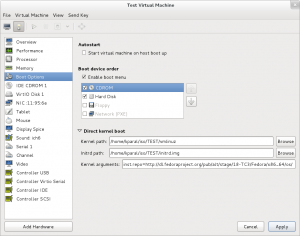
- Prepare a virtual machine that can boot kernel+initrd pair directly, e.g. using


How to test
- Boot the system via PXE, or using a virtual machine with appropriate inst.repo boot argument (it has to point to the same compose you used for retrieving
vmlinuzandinitrd.img). - Proceed with installation.
Expected Results
- The system boots (using PXE or direct kernel boot in a virtual machine) and it downloads anaconda installer from the specified remote location.
- The installer starts correctly.
- If the remote location contains a yum repository, the said repository is used for installation. This can be checked by examining the
/tmp/packaging.logfile. Example output:09:34:37,295 DEBUG packaging: adding yum repo anaconda with baseurl http://download.fedoraproject.org/pub/fedora/linux/development/41/x86_64/os/ and mirrorlist None 09:34:37,313 DEBUG packaging: disabling repo fedora 09:34:37,313 DEBUG packaging: disabling repo updates-testing 09:34:37,314 DEBUG packaging: disabling repo updates
- The installation completes and the new system initiates boot properly