
< Anaconda
Network enablement and network configuration
Two tasks:
Network enablement in installer
Configure and activate a network device to be used during installation, e.g. to get kickstart, packages, or for network-backed storage. The configuration can be supplied with boot parameters, or kickstart, or if needed user will be prompted to configure a device in UI. Network enablement can happen in loader or in stage 2:
- In loader:
- if using kickstart
networkcommand - if network is needed in loader, e.g. to fetch kickstart or updates over network, if installing over vnc, or running sshd in installer
- in rhel (stage 2 is not included in initrd) also in case of using remote stage 2, and in rhel 5 also in case of using remote repositories.
- if using kickstart
- In stage 2, using text mode UI or GUI:
- when setting up network attached storage (iscsi, fcoe)
- when using network repository
Additional devices can be activated in GUI, using NetworkManager Connection Editor (nm-c-e) by checking Connect Automatically. Since RHEL 6 and Fedora 16, additional devices can be activated (in loader) using kickstart network option --activate (this can be needed e.g. when downloading packages from one NIC/subnet and having iSCSI target on separate NIC/subnet). Activation of additional devices for iSCSI in GUI can be done also by invoking nm-c-e from Advanced Storage Options dialog (since F17?/RHEL6.3)
Once the device is activated, it can't be reactivated with changed configuration (e.g. static configuration with fixed nameserver, see bug 504983). I want to offer this possibility in GUI which requires option to activate/disconnect a device on demand (see device activation). It can be worked around by editing configuration files.
Network configuration of target system
Can be done with kickstart or in GUI using nm-c-e. Undesirably, checking Connect Automatically in nm-c-e will activate the device after the configuration is saved (see ONBOOT side-effect). I am not aware of any problems caused by this side effect which is invisible to the user (Anaconda doesn't wait for NetworkManager activating the device), but I can imagine there might be some lurking.
As you can see, configuration of installer environment and target system is not separated. It is because using nm-c-e for enablement we have to use the same configuration files. At the end of installation the config files are copied to target system.
On Live CD, network is configured in Live CD environment using NetworkManager Applet on panel. We don't copy ifcfg files in this case as up to F14 NM didn't store configuration in ifcfg files by default. The situation may have changed in F15 with NM 0.9 (TODO bug numbers).
Modes of configuration
Boot options
These anaconda boot options can be used to enable network in loader (e.g. for getting kickstart, updates image, or for vnc): asknetwork, dhcpclass, dhcptimeout, dns, essid, ethtool, gateway, ip, ipv6, ksdevice, linksleep, mtu, netmask, nicdelay, noipv4, noipv6, wepkey, wpakey.
Kickstart
Kickstart network command can be used both to enable and configure devices. The behaviour has been changing in the course of adoption of NM.
- RHEL 5 - in case of network installation the first
networkcommand from kickstart activates or reactivates (if the device has already been enabled e.g. to get kickstart using default DHCP or configuration given in boot parameters) relevant device with configuration set by the command. For non-network installs (e.g. for media or hd install) the device of the first network command is only configured for target system. Othernetworkcommands only set configuration for target system, the devices are not activated in installer. - RHEL 6.0, Fedora 15 - the same as in RHEL 5, but already activated device is not reactivated with configuration set in network command [1], it is only configured for the target system. Another difference from RHEL 5 is that the first network command device is activated also for non-network installs [2].
- RHEL 6.1, Fedora 16 - expected behaviour is the same as in RHEL 5 (bug 668395) with option to activate additional devices using new
network --activateoption (bug 638131). Note that the device from firstnetworkcommand is (re)activated regardless of the option (to keep the behaviour of RHEL 5).
For RHEL 6.0, Fedora 14, and later, devices that are supposed not to be activated in installer and have onboot option set will be activated just before downloading packages due to ONBOOT side-effect. We have no reports of problems caused by this, but in some cases activation of the device could cause a change of routing table making packages inaccessible.
Loader text UI
Serves for selection and/or configuration of a network device that should be enabled in loader. It is skipped if the information is provided via boot options or kickstart unless required by boot option asknetwork. Configuration options of this UI are a subset of nm-c-e which is used in GUI.
Once the device is successfully activated, there is no possibility to change its configuration in loader UI (see bug 504983).
Device selection:

Configuration of selected device:

The IPv6 options correspond to following options of nm-c-e:
- Automatic
- Automatic, DHCP only
- Manual
If both IPv4 and IPv6 configuration is enabled, failing IPv4 configuration of activated device means that activation is considered as failing overall (which corresponds to Require IPv4 addressing for this connection to complete checked in nm-c-e or IPV4_FAILURE_FATAL=yes in ifcfg file).
Static (Manual) configuration:

- Gateway: entry is used both for IPv4 and IPv6, only one gateway is allowed. Bad, consistent with boot options and kickstart.
- Name Server: entry can contain more name servers separated by comma.
- IPv4 Address: and IPv6 Address: is present only if manual configuration of respective protocol is selected in the previous dialog.
Anaconda GUI
When enabling network in stage 2, this device selection / network enablement confirmation dialog appears:

Selected device will then be configured using NetworkManager Connection Editor (nm-c-e):


nm-c-e is run as a separate process. Anaconda should ensure that the selected device will be actually activated in installer.
More of target system network configuration (beyond the devices that have been enabled in installer and the configuration they used) can be done from hostname screen by clicking on Configure Network button:

The saved (target system) configuration will not be applied to a device that has been already activated in the installer environment. To achieve this, the device must be deactivated and reconnected which can be done only from shell in tty2, for example by editing of configuration files. See this issue for details.
On the other hand, the device which had not been activated yet will be activated by checking Connect Automatically.
Text mode UI
Rather limited compared to nm-c-e.


Editing configuration files
Anaconda is communicating with NetworkManager mostly with ifcfg files (nm-c-e stores its configuration there too). It can be handy to edit them directly for debugging or as workaround solution. Files can be edited using shell in virtual terminal tty2 ([Ctrl][Alt][F2]). Their location is /etc/sysconfig/netwrok-scripts/ifcfg-<device name>. The configuration will be applied in installer after the device is disconnected (its ifcfg file is removed) and reactivated (an ifcfg file is copied back to its location with ONBOOT=yes set). So configuration of active device for installer environment can be changed this way:
mv /etc/sysconfig/network-scripts/ifcfg-eth0 /tmp
vi /tmp/ifcfg-eth0
mv /tmp/ifcfg-eth0 /etc/sysconfig/network-scripts
In F16 (where a NM bug was fixed) just editing the ifcfg file (instead of removing an copying/creating) should do the trick.
We should consider adding nmcli to install image.
At the end of the installation, ifcfg files are copied to target system tree to directory /mnt/sysimage/etc/sysconfig/network-scripts.
Selection of device to be enabled in installer
This is behaviour in rhel6-branch which should go into rawhide soon (but probably not into F15):
ksdeviceboot option.- Automatic use of device configured in iBFT and having active link.
- Kickstart
network --deviceoption. For the firstnetworkcommand defaults toksdeviceboot option, device used to fetch kickstart, or prompt in loder UI (how about detected iBFT device with link?). If there areessidandwepkeyorwpakeyspecified, wireless device will be used. For nextnetworkcommands--deviceoption is mandatory (will be enabled only with--activateoption set). - Dialog in loader UI if none of above applies.
Wireless
Passing SSID and WEP key with boot parameters or kickstart is supported in Fedora 14. Other methods of authentication can be set in GUI using nm-c-e, although there are some issues with AP selection which could be solved with integration of NetworkManager Applet or its substitute.
Vrata Podzimek is working on WPA support for kickstart and boot options (wireless activation in loader). Patches are on a-d-l and should go to F16.
Status updates can be found in comments of bug 473803 or on feature page Support wireless networking during installation.
IPv6
gatewayoption is common for ipv4 and ipv6 in boot options, kickstart, and loader UI. The problem is that it allows (unlike nameserver/dns) only one value (bug 562538). I think adding--gateway6andgateway6to ks/boot options is a way to go, rather than allowing both values in existinggatewayoption.IPV4_FAILURE_FATAL=yesby default so ipv4 failing and ipv6 configuration succeeding is considered as failing overall (bug 633815). Well, I think this is OK, ipv4 can be turned out explicitly in boot options, kickstart, or UI. We don't want to pass over ipv4 configuration fail silently. Watch PATCH ifcfg-rh: Enable IPv6 by default and make IPv4 optional- IPv6 accessibility of Fedora repository mirrors. From what I know it should be working. I don't have access to an outer ipv6 world so I can't even try it myself.
- Network installation on IPv6-only networks
Configuration files
We'd like to let NM do the most of the job where possible. We have to bear in mind minimal installs without NM.
/etc/sysconfig/network
Written by anaconda.
- NETWORKING=yes
- HOSTNAME set by user
- GATEWAY based on GATEWAY setting from ifcfg files (honoring DEFROUTE=no)
- IPV6_DEFAULTGW based on IPV6_DEFAULTGW setting from ifcfg files
NetworkManager can update it with HOSTNAME with SaveHostname method.
/etc/sysconfig/network-scripts/ifcfg-*
Basic files are written by anaconda in loader, updated in loader if activating device, updated in stage2 if configuring device in ks, updated with nm-c-e in GUI. For wireless the * should be replaced with SSID, not device name.
/etc/sysconfig/network-scripts/key-*
Created by NM when configuring wireless, copied to target system.
/etc/dhcp/dhclient-<DEVICE NAME>.conf
NM merges it into its dhclient file. Anaconda writes only vendor-class-identifier option based on network --dhcpclass kickstart setting. Used to write also host-name for network --bootproto=dhcp --hostname=<HOSTNAME>, but it is handled by NM and DHCP_HOSTNAME written by anaconda into ifcfg file. Should we copy the file on target system? Probably yes - bug 476364. Yes, we set dhcp timeout for NM in the file (from dhcptimeout boot option).
/etc/hosts
Anaconda doesn't touch it. AFAIK, NetworkManager updates it based on host-name dhcp option (for assigned IP and 127.0.0.1).
/etc/resolv.conf
Anaconda doesn't touch it, it is generated by NetworkManager.
/etc/udev/rules.d/70-persistent-net.rules
Anaconda copies the file generated by udev to target system. It is possible that we shouldn't do it as we don't change it and the file is generated on boot by udev anyway (bug 652499).
Bugs and issues
DVD install and ONBOOT
DVD install defaults to ONBOOT=no leaving networking down after reboot - bug 498207. This is rather sore issue. Only devices enabled during install will have set ONBOOT=yes by default. For other devices, the setting has to be configured. Default was changed in F16 - for non-ks installs if the network was not enabled during install set ONBOOT=yes for first (non-wireless) device with link detected.
This differs from RHEL 5 where a device is preconfigured to be activated automatically in network screen. This network configuration screen has been replaced by nm-c-e in RHEL 6 in par with transition to NetworkManager. Without the screen we have no easy option to make user acknowledge/confirm the default by going to next screen, so imposing the default is more debatable. Also, checking "Connect Automatically" in nm-c-e has a side-effect of activating the device (unlike the corresponding choice in rhel 5 network configuration screen)
Missing GUI pieces
Fedora feature: Anaconda/Features/NetworkReconfiguration
Missing functionality that NetworkManager Applet or, since F15 control center offers:
- device activation/disconnection (to apply reconfiguration)
- networking status information
- selection of wireless access point
- wireless authentication dialogs (can be done in nm-c-e, but it is not intuitive)
- and access to device configuration at any time
Currently, it can be worked around only by editing configuration files.
Use cases:
- Wrong static configuration (e.g. wrong nameserver). The device is considered as active (networking enabled) and a user doesn't get a chance to fix configuration in the point of fail (adding network storage, network repositories).
- Adding configuration of another device, e.g. for iSCSI target on separate subnet. This won't deal with iBFT though, see bug 710366.
Related bugs: bug 592856, 504983, 635239, 688527 (rhel6-branch), 697066, 705023.
Places in the GUI where access to network (re-)configuration (regardless of whether the network is enabled or not) would be useful.
- Standard step (the hostname screen) with optional network configuration. It is the only opportunity currently.
- Advanced storage screen.
- Repository UI screen. Note that this wouldn't help in case of edit of failing base repository which happens in the dialog before repository UI screen step (tasksel step) so successful enablement of network with wrong static values (e.g. dns) is fatal here. I attempted to reorganize repository UI to deal with it [1]..
- Before reboot to give chance to automatically activate a device after reboot, see this issue.
I was exploring various approaches:
- our own UI - it has some functional limits an was kind of first draft with UI to be polised. This is not a way to go, I don't want to duplicate and maintain the code.
- Integration of NetworkManager Applet was refused due to UX concerns at FudCON in Tempe by the team, as it requires integration of panel into installer UI which was regarded as confusing. I must say that I don't share the UX remarks, on the contrary, I see it as logic and expectable place for permanent access to network configuration (which is right thing IMO)..
- Integration of gnome-control-center that appeared in F15. Here is a draft screencast:
http://rvykydal.fedorapeople.org/anaconda_gnome_control_center_network.ogg
There are some issues I came across (see http://rvykydal.fedorapeople.org/anaconda-gnome-control-center-network.png for reference)
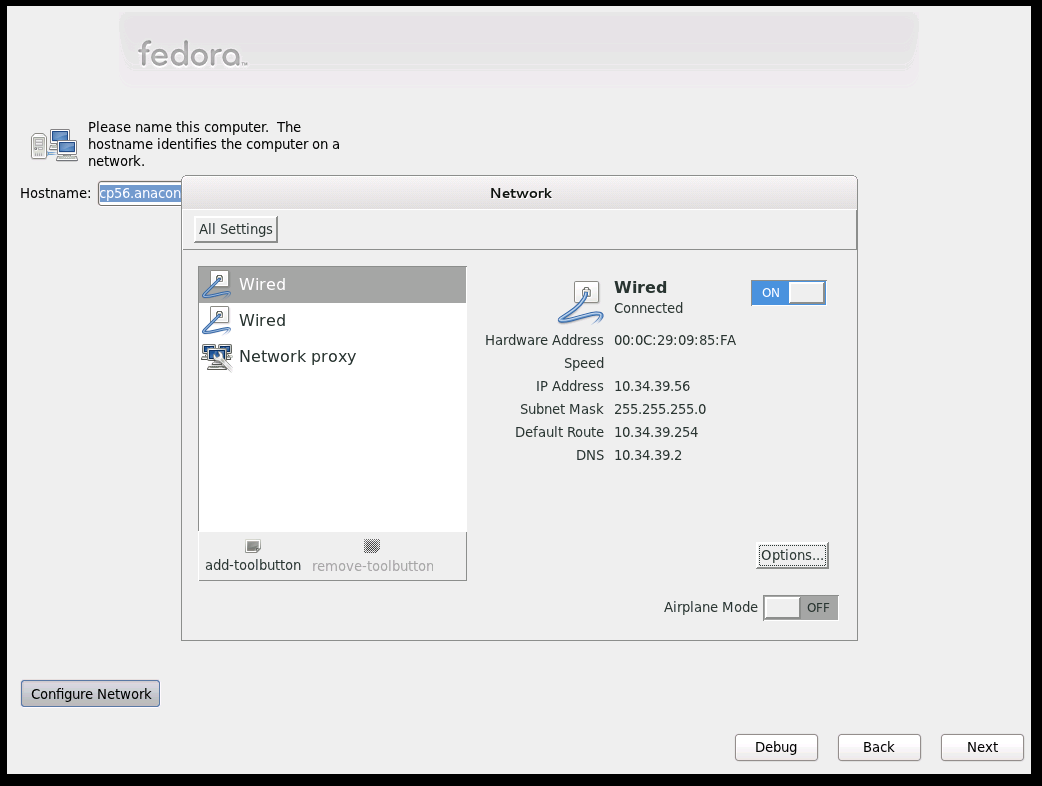
1) Add single-panel mode option to g-c-c where [All Settings] button is removed, making only network configuration accessible.
2) Add device description to g-c-c panel, see there is only 'Wired' and MAC address currently.
3) Add window decoration button ([X]) to be able to close the window/app.
4) nm-applet is needed to provide user secrets agent service, though the applet itself will not be exposed anywhere in anaconda UI - it will only provide dialogs for authentication etc.. We need to open a session in ConsoleKit for anaconda (and pull ConsoleKit into the image). In master, running ConsoleKit service kills NetworkManager, seems to hit https://bugzilla.redhat.com/show_bug.cgi?id=703734.
5) [Options] button is sensitive only if the device is active while we want to configure also other devices in anaconda, see https://bugzilla.redhat.com/show_bug.cgi?id=704119#c2
6) Size of the image - something to be explored yet. In my initial tests I added control-center package, nm-applet (negligible), commented out removal of some files from ConsoleKit package (required by nm-applet). This made change of about 8-9 MB, but there are definitely opportunities to make it better (painfully).
- Seems that I'll have to wait for new UX design.
Minimal installation
That is, without NetworkManager.
- to have working default ifcfg file for network service
BOOTPROTOis required - unlike for NM. Bugs 636526, 705718, 741199. This should be fixed in F16. networkservice is off by default - it's business ofinitscriptsorsystemd. Bug 702261, 745518.
Back and Retry in loader in poor state
- [Back] in loader UI, Manual TCP/IP Configuration screen, doesn't work in F15. It does on rhel6-branch so I guess it got screwed up in master by some other patch since I had fixed it (commit ec146852176e2b41ace7725ed8eda337842d3160).
- review [Retry] after failing enablement in loader
- Now works only in STEP_NETWORK, might want to add it also for early networking and getting ks/updates.
Given we are aiming to get rid of loader and the state of loader UI steps code (complicated, fragile, incomprehensible setting of flags) I am leaving it as it is.
iSCSI
- Multiple NICs: Routing and interface binding (bug 500273, bug 737794) issues. For storage target and ks/repositories on separate subnets: 638131, bug 710366.
- Interface binding. First stage: all nodes bound or default. Next stage: extend libiscsi, per-node choice - default as one of interfaces to choose from (do we even want this?).
- Inintscripts in dracut vs. enabled NetworkManager service:
- multiple network devices activation: one for iSCSI, second for repo
- can be done using
network --activatecommand or in GUI withnm-c-e(which lacks support for iBFT configuration though). You have to check Connect Automatically to activate the device. - automatic activation of another device for repos? bug 767086
- checks for network presence based not on device state but on connectivity check, NM patch: http://mail.gnome.org/archives/networkmanager-list/2011-October/msg00225.html
- can be done using
- iBFT autoconfiguration
- for rhel 5: bz comment
Various issues
- Consistent Network Device Naming - aka biosdevname - get rid of
HWADDRandDEVICE? NM is not ready for it (690589).
- allow single Return to accept DHCP net config on stage1 network page - 648357 - newt hacking, I can't figure it out, doubt if it is possible at all, having the buttons in a grid
- Anaconda reports "Network error" despite DHCP being successfully configured - 669019 - dhcp timeout - depends on NetworkManager bug 663820
- VNC install: -nevershared passed to Xvnc results in an inability to control install 628477 - I don't know why it is there.
- Special option (ui, kickstart, cmdline) for IPv6 gateway bug 715574
noipv4andnoipv6probably don't work correctly for more devices activated with different settings in some cases because loader is using global flags for it. We should use IPV4_UNUSED_METHOD in loaderData->ipv4method or reset the flags when processing ks at least (master, rhel6-branch).
- Support for stateless dhcp6 in loader UI - should happen in
nm-c-efirst as we provide only subset of it (bug 656335 WONTFIX)
- ifcfg files and LiveCD? Check that we copy them, also there is an issue with hostname setting for XFCE spin
- consider for rhel6-branch
- For media installs sshd can be started uselessly without networking - bug 643738
- /etc/resolv.conf is not updated with nameserver during ipv6-only static network configuration in anaconda - NM bug 672282
- IPv6 default gateway not honoured - 677609
- Documentation update:
- Fedora - TODO: update Installation Guide (see rhel installation guide update in https://bugzilla.redhat.com/show_bug.cgi?id=679104, --activate stuff and multiple device activation in ks is in F16)
- hostname setting
- NM sets hostname when bringing up device (as part of policy)
- ifcfg-rh updates
/etc/sysconfig/networkbut it seems that it just writes out a new one withHOSTNAME=only. - new in NM 9.0: org.freedesktop.NetworkManager.Settings.SaveHostname(), hostname property
- DHCP_HOSTNAME (makes client send host-name option to dhcp server) is set in ifcfg file for "
network --bootproto=dhcp --hostname=<HOSTNAME>". Relevant NM bugs: bug 596242, bug 488975.
Anaconda UX redesign
- UI pieces design: look for network in Anaconda/Work_List
- spoke type and location
- NormalSpoke off hub #1
- StandaloneSpoke before hub #1, when present?
- depending on whether network had been autoenabled
- depending on install type (e.g. DVD)
- Shortcuts from relevant spokes like sw source, network storage? Not sure if doable neatly in the framework.
- add nm-applet to installer image
- proxy configuration:
- In loader: proxy is passed to curl to get kickstart, stage2, updates.img, ...
- For repositories: it is passed to yum. Should be set in software source spoke per-repo. Plus global setting for all repos? Where should it be placed? I see it in software source spoke too. (bug 753953)
- As global environment setting: In installer, this could serve as global setting for all repos. Another request: environment variable for %post (e.g. when using wget there)? For system configuration, it doesn't seem to make sense doing it in the installer (neither via GSetting org.gnome.system.proxy nor via http_proxy env variable). See also bug 788537.
- Devices configuration (ksdata <-> ifcfg files) - we have these options:
- Writing ifcfg files directly - this is what we do now. For ibft (BOOTPROTO=ibft) this is the only option as the config is read from ibft by ifcfg-rh plugin.
- Using dbus interface - we do wireless configuration this way, we let NM write ifcfg files and keys configuration files.
- Using glib interface - NM has gobject introspection support and NM glib API seems more convenient and has quite a lot of useful utility functions.
Newui networking TODO, notes, questions
- Hostname setting
- To be designed - where to place it ? Storage is using hostname value for default names of LVM volume groups. RAID members used to be named using actual hostname by mdadm, but it seems not to happen currently. So we need hostname configured before storage is configured (or can drop default naming using hostname). For F18 it is in network spoke.
- some packages may require hostname to be set during installation? https://bugzilla.redhat.com/show_bug.cgi?id=856456. Realmd.
- UI for configured vs actual hostname? [localhost <- -> myhostname]
- Some details here: https://lists.fedorahosted.org/pipermail/anaconda-patches/2012-July/000286.html.
- systemd hostnamed service
- use the service (dbus) to set it? how does it get along with NM?
- set pretty hostname?
- hostname setting in Live CD environment
- Wireless support
- We need our own SecretsAgent dbus service, currently NM requires session running for agent, we are waiting for changes NM offering private dbus connection where session won't be required. This is also the only way to support WPA2-Enterprise (https://bugzilla.redhat.com/show_bug.cgi?id=892896)
- Get kickstart support back (loader used to handle essid, wepkey, wpakey ks options). This is currently in dracut. Requires NM in dracut.
- UI of gnome-control-center has changed, but there will be even more radical changes coming. They seem to want to drop nm-c-e.
- ? Support for hidden APs (https://bugzilla.redhat.com/show_bug.cgi?id=859610)
- Port bug fixes and features from RHEL 6
- vlan, bonding support
- kickstart in dracut (generate ifcfg files)
- UI in network spoke (control part wrapping nm-c-e)
- iscsi - A LOT of work
- fcoe
- vlan, bonding support
- Kickstart review and update - currently kickstart network configuration is handled in dracut
- review and fix ksdevice option
- NetworkManager in dracut
- reactivation of devices configured in kickstart in dracut (e.g. for install image fetching) ? currently it is done in anaconda
- L2 configuration (vlan, bonding, bridging, infiniband) - generate respective ifcfg files
- we use ONBOOT to implement --activate option (NM activates the device upon start), actual value is set later in anaconda
- races in full ks installation - waiting for connected network? (https://bugzilla.redhat.com/show_bug.cgi?id=892669)
- deafault network --device value?
- generated kickstart review (https://bugzilla.redhat.com/show_bug.cgi?id=893784)
- update ipv6 options (--gateway6, --nodefroute6?)
- Stacking of windows of nm-c-e (GUI apps we run from anaconda)
- Patch pending (https://www.redhat.com/archives/anaconda-devel-list/2012-June/msg00408.html).
- removing Alt-Tab functionality made recovery from losing window below spoke impossible or hard
- generic solution?
- Network storage configuration
- configuration (ifcfg files) modifications by anaconda is needed at the end of an installation
- FCoE, root on iSCSI: NM_CONTROLLED=no (there is NM bug open to fix it) - this might get fixed finally - seeing some progress in https://bugzilla.redhat.com/show_bug.cgi?id=607921
- FCoE: set ONBOOT=yes
- BOOTPROTO=ibft is done by ifcfg-rh, not in NM api! This may limit us in anaconda.
- Perhaps think about shortcut to network configuration (I'd rather not push UI flow this way).
- configuration (ifcfg files) modifications by anaconda is needed at the end of an installation
- Move from reading/writing ifcfg files to NM API (settings)
- is it worthy?
- impossible now, see Network storage configuration here, https://bugzilla.redhat.com/show_bug.cgi?id=893892#c36, check ETHTOOL_OPTS=
- NM's default auto connections
- missing ifcfg files -> NM activates auto connections, we dump their ifcfg files when network is initialized in anaconda
- Patch for creating default ifcfg files in dracut pending/discussed: https://www.redhat.com/archives/anaconda-devel-list/2012-July/msg00065.html, https://lists.fedorahosted.org/pipermail/anaconda-patches/2012-July/000105.html
- turn it off for servers (/etc/NetworkManager.conf) - idea to handle this by server package (Dan Williams)
- ONBOOT policy - destktop/server
- some details and notes here: https://www.redhat.com/archives/anaconda-devel-list/2012-July/msg00065.html
- ifcfg files <-> ksdata mapping
- kickstart handling in dracut - review and update parse-kickstart
- anaconda: just copy ifcfg files created by nm-c-e or go through ksdata? Details: http://git.fedorahosted.org/cgit/anaconda.git/commit/?id=e2307897400700b10d60b0a80e7b15ef7d6f1772
- Copy routing configuration (from nm-c-e) to system.
- This might become required by some multi NICs setups (e.g. for iSCSI/multipath).
- NetworkManager changes
- connection take-over (dracut -> NM, NM in dracut?)
- temporary connections
- private dbus socket
- Support for some rhel 6 features (they were backported to rhel 6 from rhel 5)?
- dhcptimeout
- linksleep
- nicdelay
- Meaning of "Connected"
- currently a device in NM state activated. Some expect actual connectivity, including correct dns setting. https://bugzilla.redhat.com/show_bug.cgi?889584
- IPv4 vs. IPv6 connected (IPV4_FAILURE_FATAL=no and IPV6_AUTOCONF=yes by default means IPv6 is enough to be "connected")
- Live CD
- interference of window manager and network spokes (keyboard shortcuts)
- Races related to slow NIC/dhcp/Wireless
- Cleanups
- using of python-dbus or GDBus vs NMClient iface
- move from devices to connections in anaconda code
- Text mode