

Deprecation
Note that the Darkserver service has been deprecated. The source code can still be found at github.
Legacy Content
Darkserver is a set of tools and service written in Python to help userspace developers to debug their applications & libraries. People will be able query the service based on build-id(s) or rpm package names. The service will provide output in JSON format as it will be easier for other tools to parse the output.
The whole idea is based on a feature of BUILD-ID which was completed in Fedora 8 time, you can read about it here.
Source Code
Source code is under github and can be found here. All development happens in develop branch. CI happens here.
Why we need the service?
To enable developer tools to identify exact package builds from which process images (e.g. core dumps) come. This can enable their analysis, debugging profiling, by finding out where the rpm / elf / dwarf files may be found, so they can download them. (This is even better than abrt-action-install-debuginfo-to-abrt-cache because that apparently cannot query files no longer indexed by repodata.)
darkclient may look like the same what can be done with repoquery:
$ repoquery -q --enablerepo='*-debuginfo' -f /usr/lib/debug/.build-id/0d/aa18d6291a5d0d174556c8c46f1345eba61a65
bash-debuginfo-0:4.2.10-5.fc16.x86_64
Just with repoquery one has only available:
- GA release from repository fedora
- the very latest update from repository updates
- possibly the very latest update from repository updates-testing
One does not have available:
- any update which has been already obsoleted by a more recent update
- any release from Koji not submitted to Bodhi
This is a real problem making bugreports investigations difficult or even lost in some cases:
- https://bugzilla.redhat.com/show_bug.cgi?id=629966#c4
- https://bugzilla.redhat.com/show_bug.cgi?id=556227#c2
- RHEL Bug 739685 - not public
It is more common but I have spent more time searching for it.
Also the repoquery -qf way is too slow as it has to download *-filelists.sqlite.bz2 files for all the repositories first.
Requests for this feature of build-id to NVRA queries implemented some other ways have been declined before:
Real world example when repoquery cannot be used
A common problem with longterm running servers is how to analyze their crashes.
- Fedora is released (GA) with package
server-1.1-5.fc16.x86_64. - Update
server-1.1-6.fc16.x86_64is released, client runsyum update. - Client machine reboots,
server-1.1-6.fc16.x86_64is started. - Update
server-1.1-7.fc16.x86_64is released, client YUM automatically updates toserver-1.1-7.fc16.x86_64.server-1.1-6.fc16.x86_64is still running, having its files unlinked on disk now. server-1.1-6.fc16.x86_64crashes generating a core file.
Now you have a core file which you want to backtrace/analyze. How do you find symbols for server-1.1-6.fc16.x86_64? Repository fedora contains server-1.1-5.fc16.x86_64 and repository updates contains server-1.1-7.fc16.x86_64.. The system where it crashed has files already with server-1.1-7.fc16.x86_64.
server-1.1-6.fc16.x86_64 is usually still present at the Koji server where it can be downloaded but there is no way how to find out it which file to download from Koji.
Another problem would be if the automatic Koji builds deletion gets in the way. But I cannot say if it can be a problem, we can find it out only after we can find which build at Koji it is. ABRT Retrace Server currently stores copies of all the released builds from the past to workaround both the Koji autodeletion and missing build-id databases.
rpm builds storage
Darkclient currently provides URLs to the Koji server. This may overload its download bandwidth when Darkclient gets in common Tools (GDB etc.) use. This is what the YUM mirrors infrastructure exists there for.
- YUM mirrors should be provided as the primary source of rpms.
- For rpms already deleted Koji URLs may be provided.
- This item may needlessly overload Koji.
- As the last fallback URL should be provided into the ABRT Retrace Server storage which contains builds already not actual (and thus no longer present in YUM mirrors) and even those already automatically deleted as old from Koji.
- This item may needlessly overload ABRT Retrace Server. Also it may be possible all the useful builds are still present at Koji and the files automatically deleted by Koji are too old to be running on any client systems.
Populating the database
The database needs to contain very every build that may be in use, to be useful at all. There are multiple possible sources of this info. Populating the database should be based on a push (not pull) technology, with some hook at Koji/Bodhi executed after a new build.
- Bodhi - but people commonly download and use Koji build n fixing their submitted Bug while Bodhi gets only later build n+1 containing also other fix(es).
- Koji real (non-scratch) builds - this is the recommended hook place. [dgilmore agreed for the koji plugin, kushal will write the plugin]
- Koji incl. the scratch builds - I do not think it is worth it, NVRA of such database would be no longer unique, scratch builds are AFAIK never distributed among more uses, URLs to Koji are special and after all the lifetime of scratch builds is very limited (two weeks).
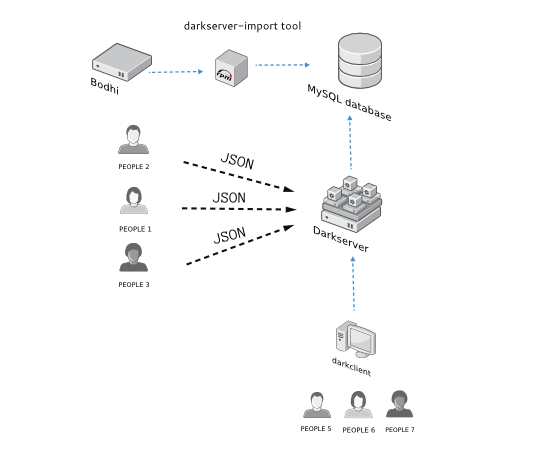
Architecture of the project
View this image.
Requirements
- Python >= 2.6
- Django >= 1.1.2
- elf-utils
- koji
- rpmdevtools
- mysql server
- httpd
- mod_wsgi
- mysql
- MySQL-python
- redis
- wget
- python-retask
- python-cmd2
- python-requests
- python-BeautifulSoup
The web service does not need any authentication. It will require read only access to the database, the users will only require to query the service.
The information on the database will be filled up by darkserver-import command, which will only execute through bodhi on every update pushed through.
Setting up the Darkserver
Install the darkserver rpms. Edit the configuration file at /etc/darkserver/darkserverweb.conf as
[darkserverweb]
host=MySQL host name
user=MySQL user
password=password
database=database name
port=3306
Now for the first time, one has to do Django syncdb, To do so give the following command:
root@localhost$ python /usr/lib/python2.6/site-packages/darkserverweb/manage.py syncdb
Start the apache server after this.
SELinux Configuration
If running in Enforcing mode, you will need to allow apache to connect to the postgreSQL server. Even if you are not running currently running in Enforcing mode it is still recommended to run the following command to ensure that there are no future issues with SELinux if Enforcing mode is later enabled.
root@localhost$ setsebool -P httpd_can_network_connect_db 1
Starting a producer
$ darkproducer start KOJI_BUILD_ID
Starts with creating jobs with the given KOJI_BUILD_ID.
Starting a build worker
$ darkbuildqueue start
Starting 3 job workers
$ darkjobworker start
$ darkjobworker start 1
$ darkjobworker start 2
GSOC work in 2013
- It is not merged yet to the development branch
- Adds new import sources which enables us to import different architectures.