< Design
Anaconda Storage UI Design
Mission Statement: To make it easier to find and identify the device(s) that you want to work with in anaconda, especially when there are large numbers of devices and/or types of devices present.
Resources
- Trac Ticket for redesign work: https://fedorahosted.org/design-team/ticket/2
- Trac Ticket for icon work: https://fedorahosted.org/design-team/ticket/63
Content
Screen Flows
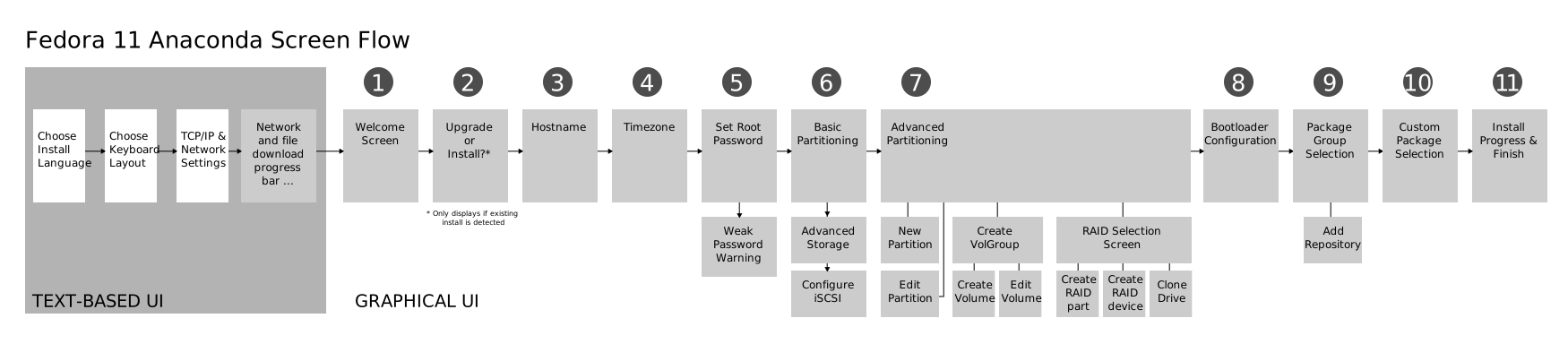
Fedora 11 Anaconda Screenflow

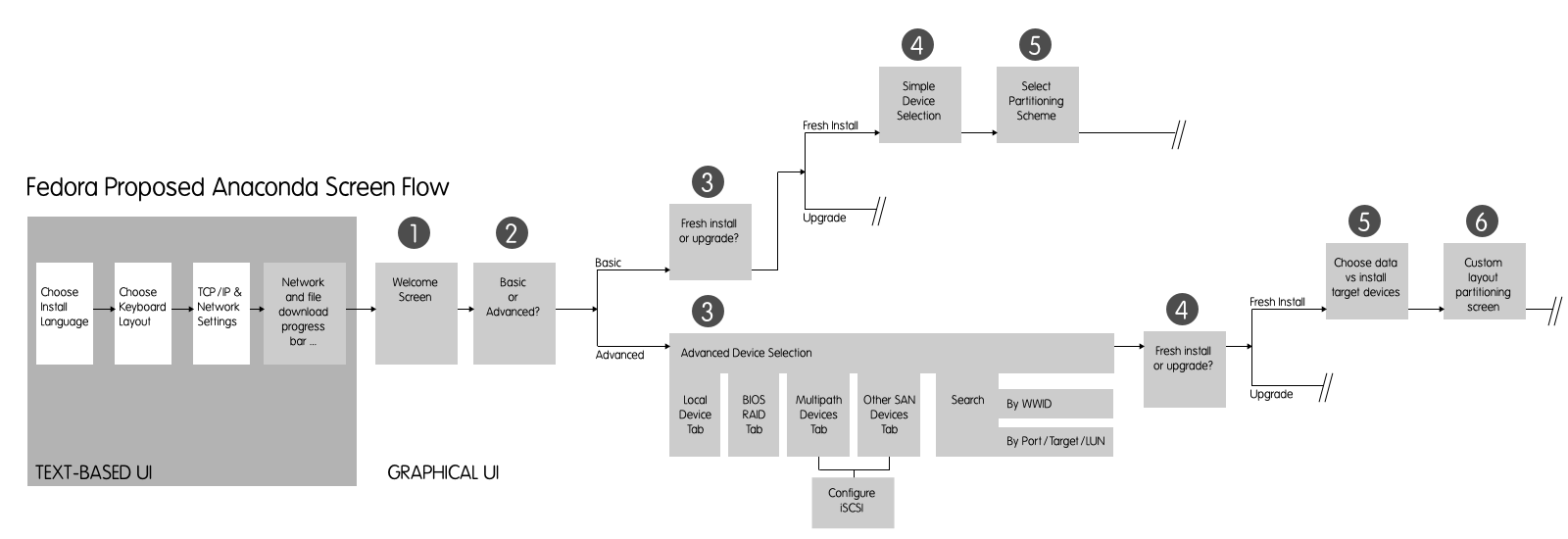
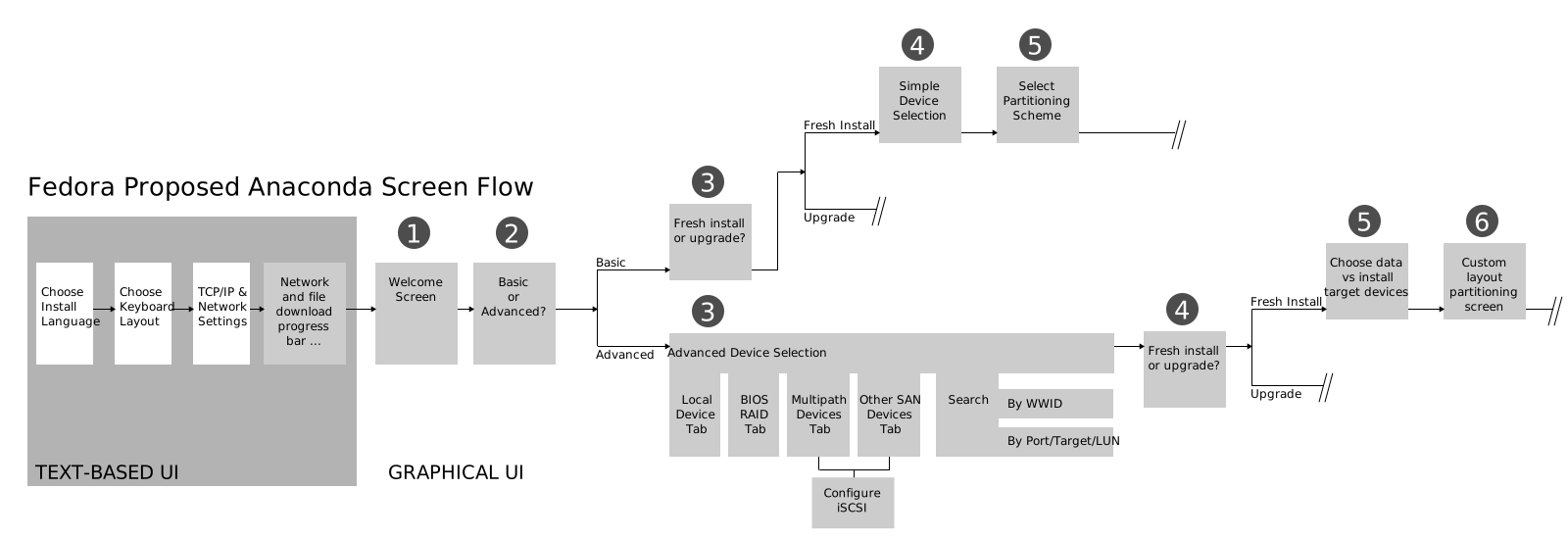
Proposed Anaconda Screenflow
The graphic below is out-of-date and needs to be updated.
Mockups
These are draft 5, updated 12 September 2009.
Changelog
Design Changes/Additions
- the mockups are now organized into two separate paths
- a status bar to indicate the total number of devices & space present in the UI vs. the selected number of devices & space has been added.
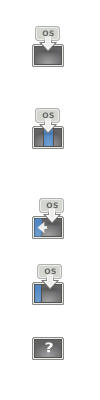
- there are now icons to explain the 5 partition screens in the basic screen flow
- boot device selection has been removed from the partition scheme screen. it was a small dropdown on that screen, now it is a full-blown screen.
- new upgrade/install icons that are distro-agnostic / de-branded
- RAID devices no longer use UNIX-style device names
Bug Fixes
- upper-right-corner list filter boxes have been cleaned up (removed old unused items)
- the capacity column was missing from several SAN-related screens. It has been added.
- fixed more instances of the term "fiber" to read "fibre"
- the term "bios raid" has been replaced with "firmware raid" (for UEFI consideration)
- the term "product name" has been replaced with "model"
- usage of the term "device" has been made consistent throughout the mockups. there are no more references to "drive"
Unaddressed Itches to Scratch
- 'remove dmraid device' button - why is it in anaconda today? what does it do? why is it needed?
- explore creating an alternative view of SAN devices using path tree
- install types screen in basic screen flow - clean it up? more info on what each does? what is "free" space?
- your concern goes here! :)
Mockup Sources
All mockups are sourced in this one SVG file:
There are two paths through the mockups. One is for using working with basic devices such as internal IDE/ATA drives, the other is for working with specialized devices such as SANs, Firmware RAID, etc.
Basic Path
Choose Installation Type

Do you want to upgrade?

Select Device(s)

Choose Partitioning Scheme

Alternative

- explain free space better - is it 'unpartitioned' ? 'free space' is ambiguous
Select Boot Device

Specialized Device Path
Choose Installation Type

Do you want to upgrade?

Advanced Device Selection - Local Devices Tab

Advanced Device Selection - Firmware RAID Devices Tab

Advanced Device Selection - Multipath Tab - Unfiltered

Advanced Device Selection - Multipath Tab - Interconnect Filter

Advanced Device Selection - Multipath Tab - Vendor Filter

Advanced Device Selection - Other SAN Tab

Advanced Device Selection - Search Tab (Port/Target/LUN)

Advanced Device Selection - Search Tab (WWID)

Select Boot Device

Mockup Archive
PDF Format
- Mockups Draft 1, 27 July 2009 (PDF format)
- Mockups Draft 2, 28 July 2009 (PDF format)
- Mockups Draft 3, 3 August 2009 (PDF format)
- Mockups Draft 4, 24 August 2009 (PDF format)
- Mockups Draft 5, 12 September 2009
- Basic Path (PDF format)
- Advanced Path (PDF format)
Wiki Format
- Mockups Draft 1, 27 July 2009 (Wiki Page)
- Mockups Draft 2, 28 July 2009 (Wiki Page)
- Mockups Draft 3, 3 August 2009 (Wiki Page)
- Mockups Draft 4, 24 August 2009 (Wiki Page)
- Mockups Draft 5, 12 September 2009 (this wiki page)
Icon Work
All icon work here is meant to be used with the GNOME icon theme and in some cases uses components from that icon theme. It is licensed under the GPLv2.
Design Team ticket 63 concerns the updating of icons in Anaconda. Some icons may need to be redesigned/created also as part of this UI redesign effort. Some notes on this follow.
Install Type Icons
Right now we have install and upgrade. One idea proposed in UI feedback in that we have three install types:
- clean install
- multiboot install (don't overwrite other OSes)
- upgrade
Here's some icons to demonstrate these:

Partition Scheme Icons
Sketches

Icons
Downloads
Preview
 use all partitions
 replace linux partitions
 shrink partitions and install to unpart space
 use all unpartitioned space
 custom layout