
(Redirected from DocsProject/WorkFlowIdeas/PrintView)


Ideas on Improving the Fedora Docs Workflow
Table of Contents
- Introduction
- Advancing the Project and Community
- Innovative Approaches
- GNOME Tools
- KDE Tools
- Java-based Tools
- Appendix A: The Documentation Workflow Cycle
- Appendix B: Type of Knowledge Contributions to a FOSS Project
- Appendix C: Components of the FOSS Docs Toolchain
- Appendix D: Another View
- References
Introduction
This is a collection of ideas currently being discussed to improve the publication of official Fedora content. These ideas have been raised by various Fedora Documentation Project team members. They are collected here so that the FDP team can review and further refine the workflow process.

The Current Setup
Media Wiki - online editing
The Fedora Project is using this approach to produce the release notes and other documents in a collaborative manner. See The Release Notes Process . We have publicly been complimented on the quality of this work.
ADVANTAGES: Ease-of-use, low barrier to entry, WYSIWYG editing.
DISADVANTAGES: No automatic tracking of cross-references, no completely automated conversion to DocBook XML, markup lacks semantic meaning (provides visual formatting only).
DocBook XML - greater flexibility
A contributor can use his or her favorite editor and DocBook XML to publish material in any desired format: web pages, PDFs, Postscript, etc. While some contributors may prefer Emacs, others are free to choose another editor. The advantage of this is the "write once, use often" approach, which is a primary tenet of modular programming and intrinsic to FLOSS. These documents are also the base for the many translations which are produced by our Translation team members.
ADVANTAGES: Flexibility of editors, automatic tracking of cross-references, version tracking, standard "code" base, useful as interim code, transformable into anything, controllable with Makefile in a build system, fits into Fedora Translation and RHEL content infrastructure.
DISADVANTAGES: Learning curve in DocBook and XML (similar to HTML).
Publican - greater versatility
Publican is the open-source tool developed originally by Red Hat and used in-house for its documentation since approximately 2006. This is a great tool for taking DocBook XML and publishing it in HTML, plain Unicode text and PDF.
ADVANTAGES: Open-source tool which handles conversion to three of the most common types of output with built-in support for branding.
DISADVANTAGES: Some learning curve.
Complexity - too many tools and techniques
Multiple tools are harder to use than one tool. Most of us know one tool really well, some of us know two tools pretty well, and a few know all the tools. There is also the issue of conversion from one format to the other.
This is why the team approach (the bazaar) is so powerful. As a community, we are stronger than as individuals. We can pool our expertise and produce a whole greater than the sum of its parts. We also have powerful FLOSS tools from which to draw.
SOLUTION: Teamwork, teamwork, teamwork and tools, tools, tools
Coordination of Effort - too many projects and priorities
This is always a challenge. Many times "we have a failure to communicate". The good news is, we have great tools at our disposal: wikis, email, IRC channels, etc. We have the tools we need already at hand - we just have to make use of them. New tools are emerging, such as VoIP.
SOLUTION: Explain to contributors the best ways to communicate. One great guide is Communicating and Getting Help .
Multilingual Teams - too many technical terms and contexts
Technical content that has a clear meaning can be difficult to write. It can be equally difficult to collaborate across language and cultural barriers.
This is a challenge that arises from our success. GNU/Linux is a truly global phenomenon. Consider all the languages the Fedora Translation Project supports. It is encouraging to remember that this challenge is overcome everyday by numerous international and multinational groups.
The English language has local dialects, shades, and subtleties. Our global audience should be foremost in our minds. We should speak and write in clear, standard English. Our challenge is to write and speak English free of idioms and local color (culture) - and still be meaningful and noteworthy (have impact or pack a punch). This is done out of respect for our Fedora users for whom English is a second language, for the translation teams, and in recognition of the future of Fedora as a multilingual distribution.
SOLUTION: Use standard English and be sensitive to differences in language and culture.
| Next Page - Advancing the Project and Community |
DocsProject/WorkFlowIdeas/Introduction
Advancing the Project and Community
The beauty of FLOSS (Free as in Livre [Freedom] Open Source Software) is the community of creative people involved in the FLOSS movement. They are faced with the same challenges as we face. Likewise, there are many creative and innovative solutions. Now more than ever, it is important to support one another in promoting FLOSS tools to encourage freedom of choice.
The common challenge is to create useful FLOSS documentation in a timely manner. The documentation must be continually updated as the software and projects evolve. It must be simple to understand yet comprehensive. The documentation must be easily translated into dozens of languages. It must be easily revised and distributed in a variety of display and publishing formats (HTML, PDF, PostScript, etc.).
The entire FLOSS community will benefit from a completely "free as in freedom" tool chain for creating, distributing, storing, and publishing FLOSS documents/content.
FLOSS Docs the FLOSS Way
A completely free (as in freedom) and automated toolchain would be of tremendous benefit to the Fedora Project as well as the FOSS community-at-large.
Related Topics For Discussion
- Upstream contribution to other documentation projects (for example, GNOME).
- Improvements to document conversion tools.
- Better communication (VoIP, online presence tools like Mug
Shot) - Cross-stream collaboration, working with documentation teams from other projects (such as other distributions and upstream projects) to create or contribute to a documentation commons.
- Offline wiki editing, such as using Gedit with the "Tag Lines" plugin. Any popular editor can also be used, as long as tagline features exist or can be easily added.
- Offline Doc
Book editing. See DocBook Authoring Tools . - Open
Office.org and DocBook. See OOoDocBook and OpenOffice and DocBook .
| Previous Page - Table of Contents | Table of Contents | Next Page - Innovative Approaches |
Innovative Approaches
This section covers new approaches as we collectively discover and/or devise them. The tools listed below are tools that are difficult to categorize. The sections following this section address the tools available for GNOME, KDE and Java environments, respectively.
Wiki into DocBook
The MoinMoin Wiki converter aims to "improve and facilitate the use of the DocBook format, inside a MoinMoin-wiki". In other words, by using an agreed subset of the MoinMoin wiki markup language, writers and editors can do distributive online editing, which is then easily converted into valid DocBook XML format. Much progress has been made, with the goal to merge the code with the upstream MoinMoin 1.6 release.
Sarma
One new approach the GNOME team is working on is Sarma, an online editor with DocBook XML import and export support. CVS commits are handled automatically. Refer to http://live.gnome.org/LiveDocumentationEditing for further details. However, this project hasn't been touched in over three years.
This is in contrast to our current approach, which requires knowledge of an editor like Emacs, DocBook XML, and CVS, along with the installation of some additional software packages.
Doxygen
"Doxygen is a documentation system for C++, C, Java, Objective-C, Python, IDL (Corba and Microsoft flavors) and to some extent PHP, C#, and D.
It can help you in three ways:
1. It can generate an on-line documentation browser (in HTML) and/or an off-line reference manual (in LaTeX} from a set of documented source files. There is also support for generating output in RTF (MS-Word), PostScript, hyperlinked PDF, compressed HTML, and Unix man pages. The documentation is extracted directly from the sources, which makes it much easier to keep the documentation consistent with the source code.
2. You can configure doxygen to extract the code structure from undocumented source files. This is very useful to quickly find your way in large source distributions. You can also visualize the relations between the various elements by means of include dependency graphs, inheritance diagrams, and collaboration diagrams, which are all generated automatically.
3. You can even abuse' doxygen for creating normal documentation (as I did for this manual) [reference is to online doxygen manual] ."
OOo2DBK
OOo2DBK "converts Open
The ooo2dbk Python script allows the export of an Open
Translated from the French
A Distributed Content Model for Developer Documentation
(This was introduced to FDP in this mail list posting .  The follow thread starts in this message .)
"The OSDL DTL Technical Board (organized) an IRC session on developer
documentation. This (was) a follow up to discussions that took place on the
first OSDL Desktop Architect Meeting  and in preparation of DAM III  where we would like to move this topic forward.
At the first Desktop Architects meeting (Dec, 2005) it was found that
ISVs have difficulty finding documentation, and choosing between
alternative libraries and tools. ISVs would like a site with complete,
up-to-date, high-quality Linux documentation. They need roadmaps
(perhaps more than one). There's a lot of misleading documentation out
there which discusses deprecated interfaces as if they were preferred;
the site should help people avoid those.
A key concern raised with respect to any portal is the maintenance
burden. The only viable way to guarantee that information in a
development portal is kept up to date is through a strong relation with
upstream projects that can provide key information with authority.
Another requirement to take into account is the desire of OSVs to point
their customers to a company site that reflects more closely their
products instead of a third party site.
The above requirements hint towards a distributed content model that
facilitates multiple distinct content owners with a feedback mechanism
to route feedback back to the authorative content owner. It may be that
the solution to the documentation problem will not be so much a single
documental portal but more so a standardized documentation
infrastructure that the various stakeholders can tap into; as a consumer
of content, as a provider of content, or as a combination of the two.
See
http://developer.osdl.org/dev/desktop_architects/index.php/Key_Topics#Developer_Portal for more information.
 Previous Page - Advancing the Project
 Table of Contents
 Next Page - GNOME Tools
GNOME Tools
Bluefish
From the Bluefish website:
"Bluefish is a powerful editor for experienced web designers and programmers based on the GTK2 GUI interface. Bluefish supports many programming and markup languages, but focuses on editing dynamic and interactive websites.
Bluefish is not a WYSIWYG[1] text editor. This is deliberate, allowing the programmer to stay in full control. To facilitate the editing process, a large number of features are at your disposal. For inserting markup and code, there are tool bars, dialogs, and predefined/user-customized menus. Syntax highlighting, advanced search/replace functionality, scalability and language function references make Bluefish a powerful tool for development."
"Currently, references are included for Apache, DHTML, Doc
MlView
"The MlView project is an ongoing effort to develop an xml editor for the GNOME environment. It is written in C/C++ and uses the gnome libraries (libxml2, gtkmm, libgnome*, etc)."
 Previous Page - Innovative Approaches
 Table of Contents
 Next Page - KDE Tools
KDE Tools
KATE
KATE is an MDI text editor application and is supplied as part of kdebase. The XML Plugin for KATE "can:
- Understand the Doc
- Show you which elements (tags) are valid at the current location
- Close (recursively) currently open elements.
- List and insert entities, which are very widely used within KDE documentation."
KXML
KXML Editor is a KDE application, that displays and edits contents of XML file. "Main features:
- Drag and drop editing, clipboard support
- Use DOM level 2 Qt library parser
- KParts technology support
- DCOP technology support
- Editing KOffice compressed files
KXML Editor 1.1.4 is [the]  last version that uses Qt library XML parser. We [are]  working on KXML Editor 2.x that use Xerces-C++ 3 parser."
Be advised that "At this time, this project is sleeping."
Quanta Plus
"Quanta Plus is a highly stable and feature rich web development environment...Even the way it handles XML DTDs is based on XML files you can edit. You can even import DTDs, write scripts to manage editor contents, visually create dialogs for your scripts and assign script actions to nearly any file operation in a project." Quanta Plus is included as part of the kdewebdev package.
 Previous Page - GNOME Tools
 Table of Contents
 Next Page - Java Tools
Java Tools
There is a whole class of Java-based applets and applications which now should be reconsidered. With Sun releasing the primary Java components under the GPL, the additional issue of compatibility with FOSS Java implementations like GCJ is greatly reduced or eliminated.

What follows is a small selection of potential FOSS tools implemented in Java:
Apache FOP
"Apache FOP (Formatting Objects Processor) is the world's first print formatter driven by XSL formatting objects (XSL-FO) and the world's first output independent formatter. It is a Java application that reads a formatting object (FO) tree and renders the resulting pages to a specified output. Output formats currently supported include PDF, PCL, PS, SVG, XML (area tree representation), Print, AWT, MIF and TXT. The primary output target is PDF."
Batik
"Batik  is a Java-based toolkit for applications or applets that want to use images in the Scalable Vector Graphics (SVG) format for various purposes, such as display, generation or manipulation.
The project’s ambition is to give developers a set of core modules that can be used together or individually to support specific SVG solutions. Examples of modules are the SVG Parser, the SVG Generator and the SVG DOM. Another ambition for the Batik project is to make it highly extensible — for example, Batik allows the developer to handle custom SVG elements. Even though the goal of the project is to provide a set of core modules, one of the deliverables is a full fledged SVG browser implementation which validates the various modules and their inter-operability."
Xalan-Java
"Xalan-Java is an XSLT processor for transforming XML documents into HTML, text, or other XML document types. It implements XSL Transformations (XSLT) Version 1.0 and XML Path Language (XPath) Version 1.0 and can be used from the command line, in an applet or a servlet, or as a module in other program."
Xerces Parser
"Apache Xerces Parser is a collaborative software development project dedicated to providing robust, full-featured, commercial-quality, and freely available XML parsers and closely related technologies on a wide variety of platforms supporting several languages."
Eclipse
Eclipse  "is an open source community whose projects are focused on building an open development platform comprised of extensible frameworks, tools and runtimes for building, deploying and managing software across the lifecycle."
Use the Eclipse Modeling framework  (EMF) plugin in Eclipse to create Java Emitter Template (JET) files.  These JET files are text files with file names that end with "jet". ".xmljet" templates generate XML.
See the tutorial, "Generating an EMF Model using XML Schema (XSD)"  for an overview of this approach.
Javadoc
"Javadoc  is a tool for generating API documentation in HTML format from doc comments in source code. It can be downloaded only as part of the Java 2 SDK."
...
"The standard doclet generates HTML and is built into the Javadoc tool. Other doclets that Java Software has developed are listed here.
- Doclet API is an API provided by the Javadoc tool for use by doclets. See Doclet Overview for a basic description and simple examples. (These documents are for version 1.3 of Java 2 SDK, Standard Edition.)
- Taglet API is an interface provided for custom formatting the text of Javadoc tags. Taglet Overview for a basic description and simple examples. (These documents are for version 1.5 of Java 2 SDK, Standard Edition.)
- MIF Doclet - Want beautiful PDF? This doclet can automate the generation of API documentation in PDF by way of MIF. It also enables you to print directly to a printer. MIF is Adobe Frame
- Doc
- Exclude Doclet is a simple wrapper program that enables you to exclude from the generated documentation any public or protected classes (or packages) that you specify. It takes a list of classes in a file and removes them from the Root
jEdit
"Some of jEdit's features include:
- Written in Java, so it runs on Mac OS X, OS/2, Unix, VMS and Windows.
- Built-in macro language; extensible plugin architecture. Dozens of macros and plugins available.
- Plugins can be downloaded and installed from within jEdit using the "plugin manager" feature.
- Auto indent, and syntax highlighting for more than 130 languages.
- Supports a large number of character encodings including UTF8 and Unicode.
- Folding for selectively hiding regions of text.
- Word wrap.
- Highly configurable and customizable."
The jEdit XML plugin "provides a tree structure browser for editing XML, HTML, CSS and Java
Vex
Vex , a Visual Editor for Xml, "hides the raw XML tags from the user, providing instead a wordprocessor-like interface. Because of this, Vex is best suited for "document-style" XML documents such as XHTML and Doc
Vex is primarily for use as an Eclipse plugin, but can also be used as a separate module.
 Previous Page - KDE Tools
 Table of Contents
 Next Page - Appendix A - The Documentation Workflow Cycle
Appendix A: The Documentation Workflow Cycle
Note: The following documentation workflow is inspired by comments by Paolo Borelli, which appear on the aforementioned GNOME Sarma project page, http://live.gnome.org/LiveDocumentationEditing. Discussions with Karsten Wade and Paul W. Frields also heavily contributed to this concept. It's included here as a discussion point. (The artwork is mine) - JohnBabich
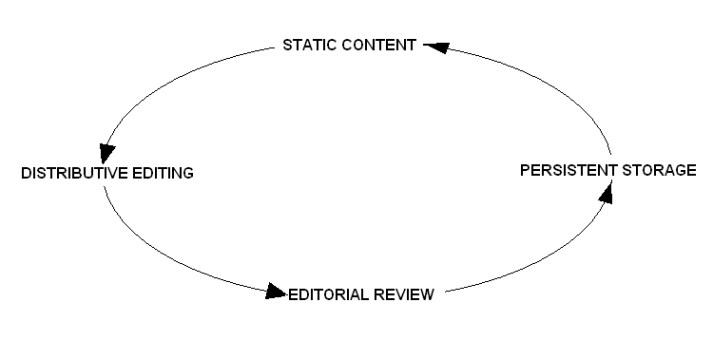
The four stages in the Documentation Workflow Cycle (Patent Pending - Not!) are:

- Static content, posted on website, generated automatically from CVS or equivalent version control system. This function would be enhanced by Plone in our scenario.
- Distributive editing, where writer edits documentation online wiki-style or offline with tagline-capable editor. The writer gets task assignments through Bugzilla. Material edited offline is reposted to the wiki for review and/or further revision by team members.
- Editorial review, wiki content reviewed by editors, before it is checked into CVS. Editorial functions include document version tracking, selection of best material from multiple versions, spell checking, and conversion of text to Doc
- Persistent storage, edited Doc
 Previous Page - Java Tools
 Table of Contents
 Next Page - Appendix B - Types of Knowledge Contribution to a FOSS Project
Appendix B: Types of Knowledge Contributions to a FOSS Project
This table is an excellent overview of how the FOSS community really works. It serves as a great introduction to the "big picture". The author, Daniel German, is an assistant professor in the Department of Computer Science at the University of Victoria. He is a core contributor to
Panotools , a FOSS project hosted on Source
Type of contribution
Description


Source code
This is perhaps the most visible contribution.


Documentation
In the form of Web sites, user and developer manuals, magazine and Web articles, books, FAQs, etc.


Internationalization
Translations of the software and documentation into different languages.


Code Reviews
The discussion and improvement of source code contributions.


Testing and debugging
Formal or informal testing and debugging.


Bug reports
Submit bug reports that can be used by the development team to track and fix defects.


Configuration management and build process
Tasks required to maintain the environment necessary for multiple developers to participate.


Distribution of binaries
Preparation of binaries for download by any user interested to try the software.


Suggestions
Ideas on how to improve the product.


Answers to developer’s questions
They help other developers who are contributing.


Answers to user’s questions
They help individuals who are trying to use the software.


Release management
Release management Dedicated to prepare and advertise new releases.


Legal
They provide information regarding legal issues, such as licensing, and other intellectual property issues.


Web site development and maintenance
These contributions usually gather knowledge from other sources and make sure it is persistent. It can also include those who contribute to wikis.


“Pointers” to knowledge
Perhaps the smallest type of contribution it involves answering a question by “pointing” to another source of information (such as a Web site or a research article).


Distribution packaging
Knowledge needed to prepare packages to be included in distributions (such as SUSE, Red Hat, Fedora, etc).
Source: "The Flow of Knowledge in Free and Open Source Communities", Daniel German, presented at 2nd International Workshop on Supporting Knowledge Collaboration in Software Development (KCSD2006) in Tokyo, Japan on September 19, 2006.
- "The Flow of Knowledge in Free and Open Source Communities" (PDF document), by Daniel M. German:
 Previous Page - Appendix A - The Documentation Workflow Cycle
 Table of Contents
 Next Page - Appendix C - Components of FOSS Docs Toolchain
Appendix C: Components of the FOSS Docs Toolchain
Background Information
This section explains why we should care about the W3C standards, XSL and XML, how they are related and interact with each other.
The World Wide Web Consortium (W3C) is the authoritative international standards organisation for the World Wide Web. The W3C has defined standards, which include XML and XSL, that go beyond the internet protocol suite.
First of all, we need to give some definitions.
Extensible Markup Language (XML) is a markup language which can be used for defining various types of files, such as configuration files, data structures and documents.
Extensible Style Language (XSL) is an XML transformation language. An XML transformation language is a computer language designed to transform an input XML file into an output file of a particular format.
There are two possible types of output files:
- Another XML file in a different format
- A non-XML file, such as PDF or ODF.
Five Necessary Components
This section explains five relevant classes of XML and XSL tools. They are:
- DTDs
- XSL Stylesheets
- XML Text Editors
- XSLT Processors
- XSL-FO Processors
DTDs
The Document Type Definition (DTD) is an XML schema language used to define the permissible building blocks of an XML document. It defines the structure of the document by means of a list of legal elements. A DTD can be declared within your XML document as an internal reference, or in a separate module, as an external reference.
With a DTD, a team agrees to use a common data structure for interchanging data. An application can apply a standard DTD to a document to verify that the document structure and markup (syntax) is valid.
A Document Type Declaration, or DOCTYPE, is a directive which links a particular XML file (in our case, a document) with a Document Type Definition (DTD).
XSL Stylesheets
Extensible Stylesheet Language (XSL) is an XML language for transforming XML documents.
An XSL stylesheet is a template written in XSL for directing the transformation of an XML document.
A helpful comparison is:
an XSL stylesheet is to an XML document as a CSS file is to an HTML document.
XML Text Editors
The text editor is used to create or modify the XML source document.
XML text editors can range from basic editors like Gedit, to sophisticated programming editors like Emacs, to WYSIWYG XML editors like Quanta Plus.
XSLT Processors
XSL Transformations (XSLT) processors are the programs which do the actual conversion of the XML document according to the directions provided by the XSL stylesheet.
XSL-FO Processors
XSL Formatting Objects (XSL-FO) is an XML markup language used to generate non-XML documents, such as PDFs.
Probably the best known XSL-FO processor, or program, is the Apache Project's FOP.
 Previous Page - Appendix B - Types of Knowledge Contributions to a FOSS Project
 Table of Contents
 Next Page - Appendix D - Another View
Appendix D: Another View
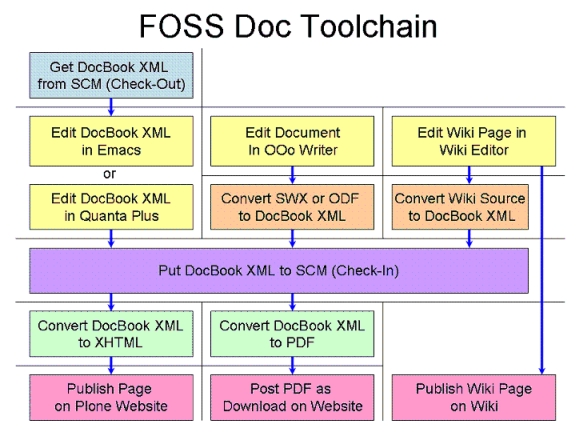

 Previous Page - Appendix C - Components of FOSS Docs Toolchain
 Table of Contents
 Next Page - References
References
Fedora Docs Project
- "Canonical Source" on FDP Documentation:
- Toolset Idea (Fedora-docs-list posting by Paul Frields):
https://www.redhat.com/archives/fedora-docs-list/2006-November/msg00068.html
- How Fedora Release Notes are Produced:
- Document Project Tools - the FDP place to discuss our tools:
Wiki Editing
- Writing Documents using the Moin
- Moin
- Moin
- Wikipedia reference article on text editor support, very adaptable to Moin
DocBook XML
- Paul W. Frields' articles on Doc
Introduction to DocBook XML
Introduction to DocBook XML, Part 2
- Linux Documentation Project's Author Guide:
- Writing Documentation Using DocBook - A Crash Course (in English & French):
http://opensource.bureau-cornavin.com/crash-course/en/index.html
- Eric Raymond's LDP Doc
- Doc
Emacs as a Writing Tool
- The Woodnotes Guide to Emacs for Writers (by Randall Wood):
http://therandymon.com/woodnotes/emacs-for-writers/emacs-for-writers.html
- PDF Version:
- The Woodnotes Emacs Cheat Sheet for Writers (not Coders):
http://www.therandymon.com/papers/emacs-writers-cheatsheet.pdf
Vim as an XML Editor
- Vim as XML Editor:
GNOME
- The GNOME Handbook of Writing Software Documentation:
KDE
- The KDE Documentation Primer:
- The KDE Doc
- Quanta as a Doc
http://quanta.kdewebdev.org/tutorials/quanta-docbook/quanta.html
Plone CMS
- Plone Test Site for the Fedora Project:
- The Definitive Guide to Plone:
- Issues Surrounding the Fedora Project's use of Plone:
PDF Conversion and Output
- Current Issues with PDF Conversion:
- Generating PDF versions of the KDE documentation
http://people.fruitsalad.org/phil/kde/pdf-stuff/pdf-instructions.html
OpenDocument Format (ODF)
Note: Great source of information on ODF along with links to ODF applications and viewer.
- Open
- "This is the official community gathering place and information resource for the Open
FOSS Documentation Workflow
- "The Flow of Knowledge in Free and Open Source Communities" (PDF document), by Daniel M. German:
DocBook Tools: An Overview
Note: This excellent reference describes commercial packages, which are purposely excluded in the FOSS Doc Toolchain, as well as FOSS packages.
- "Doc
 Previous Page - Appendix D - Another View
 Table of Contents