
< Features
Time Zone / Location / Locale Improvements
Summary
Improve the handling of time zones, and related to that, the handling of location in general, and related to that, locale in general. (The exact scope of this feature is not yet completely determined.)
Owner
- Name: DanWinship
Current status
- Targeted release:
- Last updated: 2008-08-13
- Percentage of completion: 50%
libgweather includes a location-selection entry, and intlclock uses it. Timezone names are localized in the location database.
system-config-date, firstboot and evolution are not done yet.
Detailed Description
Time Zone / Location in Fedora 9
Fedora 9 has (at least) 3 timezone settings:
- The system timezone, set in firstboot or from system-config-date. (They both use the same code.)
- The (default) intlclock timezone/location (which is also used to get weather information).
- The user can also choose additional locations to show the time/weather of
- The evolution calendar timezone
Although the system timezone is nominally system-wide and the intlclock and evolution timezones are nominally per-user, most users will want all three to be the same. evolution should pick up the system timezone automatically by default, although for historical reasons it does not. intlclock on the other hand cannot set up a "location" entry based solely on the system timezone, because it needs information about weather stations as well, which can't be derived from the timezone. So if we want intlclock to be correctly configured automatically, that means the user has to pick a location rather than merely a timezone during firstboot.
Location-picking UIs
- To set your location in intlclock, you type in a city name, or pick it from a long list (which at least supports find-as-you-type). If your city isn't in the list, then you have to guess a likely nearby city, or else find your country or region in the list and then scan through the available cities.
- For comparison: OS X's weather dashboard widget is configured with a text entry that accepts a "City, State or ZIP Code". You can enter any city in the world (it pops up a list of completions/disambiguations if necessary); if there is no weather station there it will use weather data from a nearby station. (This seems to be how most online weather sites work as well, qv libgweather bug 530178 .)
- The initial weather location is set based on the address you entered into the product registration form during their firstboot equivalent.
Unless we can embed Google Maps into the UI, which we presumably can't, we need to stick with a textual interface here. intlclock's current interface can be improved upon. We may be able to use a free webservice like GeoNames to map arbitrary city names into coordinates which can be used to find a nearby weather station.
In GNOME 2.23, libgweather now has a location database that is more focused on big cities, making it easier for users to pick out a location that is close to them. (qv [http://bugzilla.gnome.org/show_bug.cgi?id=538464 libgweather bug 538464])
Time Zone-picking UIs
Even if timezone selection is primarily a side-effect of the location-selection UI, we still need to present our guessed timezone to the user, and allow them to correct it if it's wrong. (And there are also other situations where we need to present timezone names, such as in the evolution calendar.)
- firstboot/system-config-date and evolution use a zoomable map, with the tzdata examplar cities marked on it, and a list or combobox containing all of the timezones underneath. The user can either pick a timezone from the (very long, poorly-organized) list, or else pick it on the map. In some cases, the place you need to click on the map does not really correlate well with your actual location. (Eg, if you live in Miami, you must click New York City, 1088 miles (1751 km) away.). The timezone names are mostly unlocalized.
- Note that they don't use the same code; system-config-date reimplements the evolution map in python
- In GNOME 2.23, intlclock now uses a timezone menu widget from libgweather, that provides a localized list of timezone names, sorted by country.
- In OS X, to change the timezone, you're given a map of the world, but without any cities marked. When you click on the map, it highlights a vertical-ish band indicating a particular GMT offset, marks a city close to where you clicked, and asks you to pick the closest city from a pop-up menu. The list of cities is larger than the set of cities that have associated tzdata timezones, but not unmanageably large. (Eg, the GMT-5 strip contains 12 US cities, 3 Canadian cities, and 6 Central/South American cities.) When you click on a city, it identifies the timezone with a timezone abbreviation. (Eg, "EDT".)
- On Windows, the timezone selector is a pop-up menu containing 90-or-so timezone names, ordered by GMT offset. All of the names are of the form "Foo (Standard|Daylight|Summer) Time", and many of them were apparently made up by Microsoft. (List here with mappings to tzdata names.)
There are two issues here:
- It should be easy to pick a zone
- It should be easy to recognize what a zone refers to
If we want a map-based interface, something like OS X's would be better than the current one (although we don't currently have any information about the shapes of timezones). OTOH, if the timezone picker is mostly only going to be used when the location picker fails, it may be better to have a non-map-based interface, so that it's not biased in favor of making the same mistakes the location interface makes.
We would also want to use the localized timezone names from libgweather; the tzdata timezone names are confusing for a variety of reasons (discussed in libgweather bug 529054).
tzdata explicitly identifies which countries go with which timezones, so we could also filter the list to only show timezones that are relevant to the current country; this would cut the list down from 400 entries to at most 11 (for Russia). We could also add the "generic" timezones (eg, "GMT-5") at the end of the list, to be used as a last resort in cases where tzdata hasn't kept up with the latest changes. (libgweather's GWeatherTimezoneMenu does not currently do these things)
Additional Location-based Configuration
What else can be configured on the basis of location?
- Default language/keyboard layout/locale assumptions.
- By the time firstboot runs, the user will have already chosen a language and keyboard layout. However, some users will have chosen en_US for the system language even though they are not in the US; generally they want LC_MESSAGES to be en_US.utf8, but LANG to be the correct default for their location (so as to get the right paper size, etc). We could do this automatically / semi-automatically.
- Apparently anaconda only lets you pick "English", not specifically en_US, en_GB, etc. (And presumably likewise for other languages.) So we should attempt to nationali[zs] e the base language setting appropriately at this point. (Being aware that some non-US people may nonetheless prefer to stick with en_US.)
- See also this thread on fedora-devel-list, bug 442567 , bug 432887
- There is also the question of web browser Accept-Language ordering when LC_MESSAGES does not match the location. There is not a single right answer here.
- We can't have the user pick a location in anaconda and then guess the language/keyboard from that, because a map-based interface for picking location is complicated enough that it requires instructions (at least "pick the city closest to your location. click to zoom / right click to zoom out"), which requires knowing what language to show the instructions in; and a typing-based interface for picking location requires knowing what kind of keyboard the user has beforehand so you can interpret the typing.
More blue-sky-ish, and possibly dumb:
- We could compare the user's home location against a list of known Linux User Groups, and if there's one nearby, we could have a link to it from the start page in Firefox.
Benefit to Fedora
Integrating the disparate dialogs and replacing Fedora-local code (eg, system-config-date) with upstream functionality (libgweather/intlclock, etc) etc will simplify maintenance.
Scope
libgweather/intlclock- time zone localization issues (libgweather bug 529054). (Done in libgweather 2.23.6)
- UI improvements to location selection:
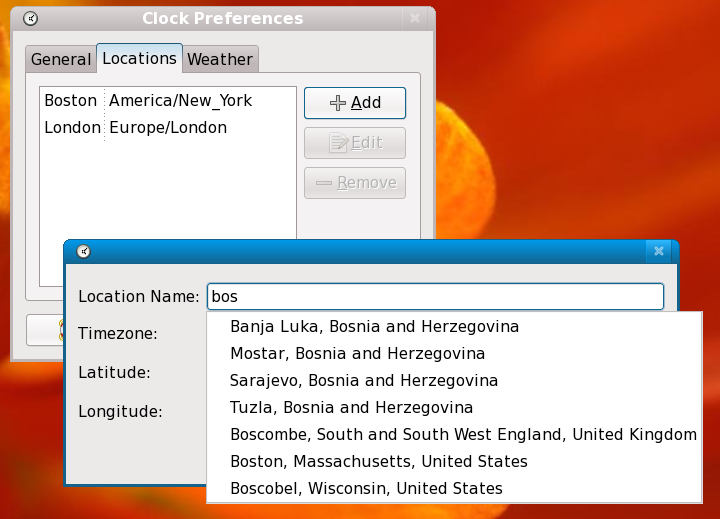
- do completion/find-as-you-type directly from the "Location Name" entry rather than requiring a click on "Find...". (Done in libgweather 2.23.6)
- allow alternate forms of entry. Eg, "city, state" or "city, country" to disambiguate same-named cities. (Done in libgweather 2.23.6)
- recognize abbreviations for state and country names, recognize postal codes, etc
- look up names in a free online database when possible
- UI improvements to timezone selection:
- When using pop-up menu, limit it to only show likely timezones, and put the others in a separate dialog. Or else, show the likely ones first, then a divider, then the unlikely ones
- Do we want to keep the map? Can we make it better?
- Instead of picking the timezone of the closest tzdata exemplar city to the click, we could take the timezone of the closest Locations.xml city (though still only showing the tzdata cities, or at least, not all of the Locations.xml cities).
system-config-date- Can this go away? (not for F10 at this point)
- Where would NTP be configured?
- Where would "System clock uses UTC" be configured?
- Need to explain what that means better anyway
- Should use same timezone widget as intlclock (via libgweather)
- Requires python bindings of libgweather
- Can this go away? (not for F10 at this point)
firstboot- Allow user to pick a location, not just a timezone
- Where will this location be stored?
- Patch intlclock to pick that up as a default
- Use location/timezone selection widgets from intlclock (via libgweather)
- Possibly do various locale-related tweaks as discussed above
- Allow user to pick a location, not just a timezone
evolution- Should default to using the system timezone. (libgweather has code to figure this out)
- Should use same timezone widget as intlclock (via libgweather?)
- Should display appointments using localized timezone names
- Should use libgweather for weather, and not ship its own Locations.xml file
How To Test
- Buy a GPS
- Travel around the world, spending a few days in each location doing testing
- Fix bugs encountered, revisit buggy locations to re-test
- Submit expense report to the Board
User Experience
- Users who live somewhere should be able to tell Fedora where they live, and have it set their timezone and weather station appropriately, even if they live somewhere really obscure. Furthermore, they should only need to enter this information once. (Unless they move...)
- Users who travel with their computers should be able to easily have the computer's timezone and weather indicator "follow" them.
Examples of the new widgets:
- Autocompletion in the location entry:
- Timezone selection:
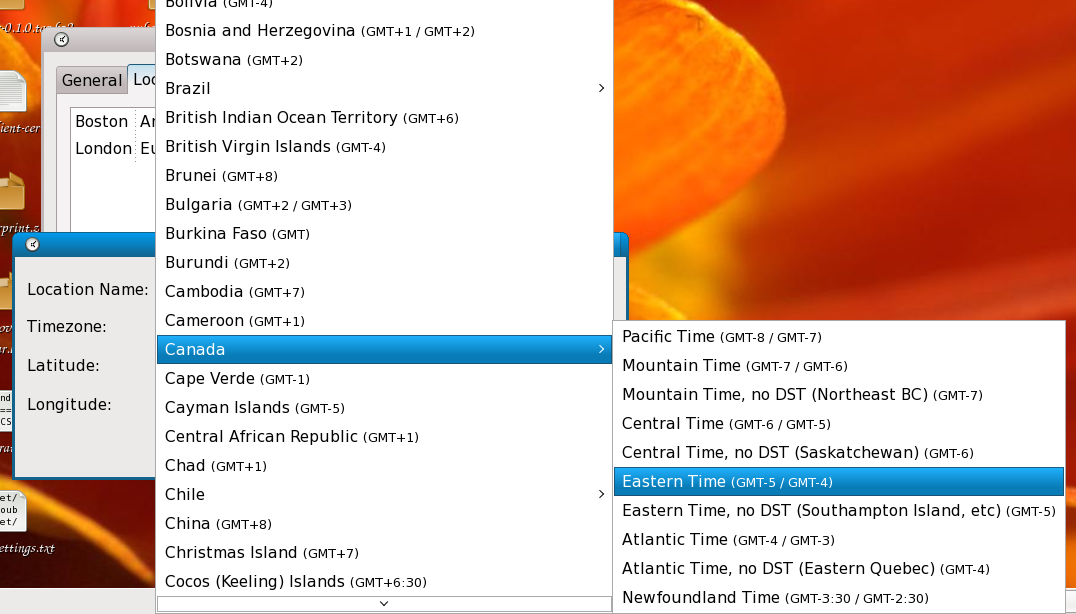


Dependencies
- Various upstream libgweather bugs mentioned above
- This implements part of FeatureFirstboot , and contrariwise is affected by any changes that they might make to the overall firstboot structure
- This either integrates with or is an alternative to LocalePreferences
Contingency Plan
- Continue using the existing code. Some of the improvements suggested here can be adopted even if others aren't finished.
Documentation
There is no user documentation at this point.
Release Notes
The user interface for selecting time zones and locations in the clock applet has been improved, giving a much smoother user experience.