
From Fedora Project Wiki

Description
This test will verify that anaconda can download the requested updates.img file using a HTTP/HTTPS url.
Setup
- There is an
updates.imgprepared for you in this test case. If it doesn't work or you want to use a different one, see this page for image creation instructions, and prepare your own file. A good thing to change in the image is the What language would you like to use during the installation process? text inpyanaconda/ui/gui/spokes/welcome.glade, as this text is displayed on one of the first screens. Then host theupdates.imgon a httpd server accessible by your installation.
How to test
- Boot the installer while specifying the HTTP URL for the updates image. Use our provided one:
inst.updates=https://fedorapeople.org/groups/qa/updates/updates-openqa.img
or your own one. - If it's possible, visually identify that the update was applied. With the update above, go to the Installation destination dialog and see that the disk capacity text has a pink background instead of the default gray background:
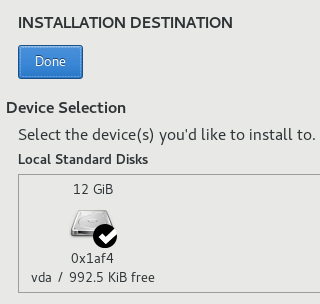 Default look
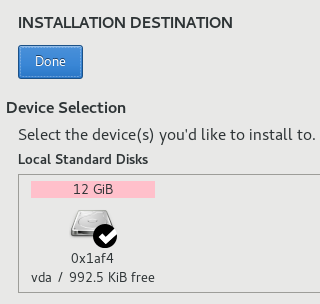 Updated look
 - If it's not visually possible to confirm the update was applied (there were just code changes), verify the existence of
/tmp/updatesdirectory, which should contain all updated source code files. (Please note if your updates.img doesn't change any source code files, but e.g. just an image, then the/tmp/updatesdirectory is not created.) - Proceed with installation


Expected Results
- Anaconda downloads the
updates.imgand copies its content to/tmp/updates. Any changes you included in the updates.img file are applied (image changes, text adjustments, source code changes, etc). - Anaconda proceeds without related errors