
Single Source Summary for Fedora 9 Release Announcements, etc.
The purpose of this page is to provide a single point for all release related documentation - that is, release notes, press release and summary - to be created and edited during each release cycle. The page does not need to read beautifully from top to bottom, as obviously each of the documents mentioned has very different purposes: instead the page will be split out to provide the basis for each of these documents which will then stand on their own. By collaborating on a single page we hope to avoid duplicating each others work and content!
How It Works
File:Releases 9 SingleSourceSummary sss.png
(File:Releases 9 SingleSourceSummary sss.svg SVG source] )
Press Release
What's Needed
This is needs to be a brief summary:
- two to three paragraphs long
- praise key features of each release
- praise community that came together to create release
- point to release overview/notes for more details
- perhaps mention Fedora's core principles? - nobody ever seems to remember why we don't want to do proprietary, patented bits in Fedora!
Release Talking Points
These are three to five short paragraphs of one to two sentences each. These are used by local teams to write up native-language announcements in a culturally appropriate manner. They need to be understood by non-native speakers, such as Ambassadors, who can use them to begin a conversation about the talking point in their native language with other users, etc.
Previous year examples are at Releases/TalkingPoints , which is similar to where the actual work will be references to locale teams. The eventual Releases/Ver./ReleaseAnnouncement/TalkingPoint needs to pull the actual talking points from here.
Fedora 9 (Sulphur) Talking Points for Release Announcements
We have shortened the main thrust of what makes Fedora special to four fundamentals: "Features. Freedom. Friends. First." These aren't really useful for talking to the press, but they are useful to remind ourselves what makes a story meaningful in Fedora:
- Fedora is a (arguably *the*) center for innovation in FOSS, where many of the best new features get their start.
- We believe in openness and transparency in what we do and advancing free and open source software.
- We are a community of contributors working in partnership, and we believe in being each other's boosters.
- Fedora is the first to deliver, and while we're happy people reuse the open source goodness we provide, we want people to know who's behind it.
Feature Points
- Fedora features the first persistent, nondestructive LiveUSB. Your USB key can become a fully booting and functional Fedora you can carry with you anywhere, to use on any system that can boot on USB (most computers made in the last five years). Persistence means you can change the system, updating it with new software, and saving your own work as well. Nondestructive means you can turn any already-used USB key with 1+ GB free space into this kind of "computer in your pocket," without any messy backing up, reformatting, repartitioning, or other contortions.
- Fedora 9 is the first major Linux distro to feature KDE 4 by default -- The K Desktop Environment (KDE) recently introduced a major new revision with many sweeping changes both in the user interface and in its many back-end subsystems. The Fedora KDE team, which is driven mainly by volunteer community members, did all the work to integrate KDE 4 into Fedora for this release. The group set up its own roadmap and milestones, working in coordination with the upstream KDE project where appropriate, and as a result users of Fedora will be able to use the latest technology for their KDE desktop. This is a great example of how the Fedora community is completely empowered to take initiative on bringing compelling new features into the distribution.
- Fedora 9 uses the new PackageKit by default -- PackageKit is an extremely flexible yet simple method for managing software in any Linux distribution. It integrates well with many existing package management systems and provides easy-to-use graphical tools for installing and updating software. By providing one package management tool that works across all Linux distributions, PackageKit improves the lives of all Linux users, since there's no need to memorize different commands or tools based on one's personal choice of Linux distribution.
- Fedora offers the new FreeIPA -- IPA is "Identity, Policy, and Auditing" -- which is a way for system administrators to easily manage security information, such as authentication for people and computers in a larger, mixed environment. In the past, sysadmins would have to build their own solutions to some extent, configuring directory services, domain names, security settings, making their services talk to Microsoft Windows domains and Active Directory, etc., all separately and using a lot of different command-line tools. FreeIPA's goal is to have a single toolset with an easy Web interface and command-line utilities that allow a sysadmin to easily provision and run all these services. Right now we the "I" (identity) features are complete, and work has started on the "P" and "A" (policy and auditing) features. This is an example of a technology that has great potential impact for the enterprise, and people might see this in future Red Hat Enterprise Linux offerings. (http://freeipa.org/ for more info)
- Fedora contributor Dan Williams has extended NetworkManager to new heights of functionality. It now plays well with static IP addressing, allows multiple connections and connection sharing, features easy connection editing, and supports mobile broadband, among other features. Thanks to diligent upstream work, NetworkManager can now be activated in Fedora 9 by default, as has been planned for some time since its initial release.
Community Points
- There are many ways to get involved in Fedora that allow people to contribute back to open source. We have community powered groups that do artwork, documentation, website design, system administration, marketing, bug triage, packaging, and more. With our new easier joining process, it's never been easier to get involved in Fedora. Just go to http://join.fedoraproject.org/ to get started.
- Fedora's Artwork project is a shining success of the Fedora philosophy. Every release cycle, a team of talented artists start with by proposing theme ideas. They sketch, photograph, and brainstorm ideas for how to turn these themes about Fedora into an elegant design. The digital artists on the team then go through an iterative process turning the designs into reality, including desktop backgrounds and other thematic elements for the release. For Fedora 9, the theme was "waves," showing the spreading effect that Fedora's innovative and dedicated community has on all of free and open source software through our hard work and devotion to working well with upstream projects.
- Fedora's KDE team is a perfect example of getting involved to make something happen in Fedora from a development standpoint. The KDE team is made up mostly of volunteer community members. For Fedora 9, they did all the packaging work, bug identification and triage, and upstream coordination to bring KDE 4.0.3, the newest edition of the popular dekstop environment, into Fedora. The Fedora KDE team coordinated their work and milestones to ensure that Fedora 9 could be the first distribution to have KDE 4 available as the default for KDE users. KDE 4 includes a huge number of new features, and including it in Fedora will give it wider exposure to a broad range of users and developers.
- In Fedora, the community runs our distribution. Community governance, from the various project steering communities to the Fedora Project Board, results in a true working meritocracy. The people who devote their time to advancing free and open source software in Fedora have the power to determine what we do next.
- Because we insist on working with upstream providers, the code produced in Fedora has a track record of better developer community acceptance, long-term maintainability, and relevance to the entire free and open source ecosystem. The work Fedora community members do is reused in many other Linux distributions, and we're proud to see Fedora's features reproduced elsewhere. Fedora contributors have produced such innovations as:
- NetworkManager
- PulseAudio
- OpenJDK integration (both 7 and 6)
- PackageKit
- PolicyKit
- AIGLX
- func and cobbler
- libvirt, virt-manager, and oVirt
- HAL
- udev
- D-Bus
- Frysk and SystemTap
- SELinux
- The Fedora Users and Developers Conference, or FUDCon, goes global this year. FUDCon events bring contributors together regionally in North America, Europe, Asia-Pacific, and Latin America. FUDCon events feature everything from hackfests -- where contributors get together to brainstorm, design, prototype, and improve free and open source software -- to conference sessions where contributors can learn from each other. And unlike other similar conferences, FUDCon is FREE FOR EVERYONE. These events are truly community events where everyone from new users to Linux luminaries meet, mingle, and work on cool new stuff.
Content
As Fedora contributors, one of the most exciting parts of the development process of new Fedora distributions is determining which cool, new features are included in the next release. Fedora 9 (Sulphur) is due out at the end of April 2008, and we started making plans for it as soon as we released Fedora 8 back in November. We’ve been implementing the changes we want included in this release, and with the Fedora 9 Alpha release today, it’s time for the whole community’s input. Obtain your Alpha live spin here.
During each Fedora cycle, there is an Alpha release, a Beta release and a series of weekly snapshot releases. The Alpha release gives everyone the opportunity to provide feedback on the work that has been done so far as the first step in the testing cycle. It’s the first time that the larger Fedora community can get really involved in testing out the new features and is encouraged to provide input on what’s working, and what’s not. It’s easy to gain access to the Alpha release because you don’t have to install any software — everything you need is provided through live CDs. Then, to give us feedback, you can file bug reports and enhancement requests and make other recommendations.
If you want to help us test and shape the next release of Fedora, you can find details about the new features we’re exploring, about how to get involved in the Alpha release and about how to provide feedback and get involved in Fedora by visiting our Fedora 9 Alpha release notes.
Release Overview
What's Needed
Alphabetical breakdown of the features listed at /Releases/*/FeatureList, divided between Desktop, Server and System, explaining:
- what they are
- why it matters to end-users
- how to try it?
- link back to feature page and upstream for more details
- some screenshots.
What is Fedora 9?
Fedora is a set of projects sponsored by Red Hat and guided by contributors. These projects are developed by a large community of people who strive to provide and maintain the very best in free, open source software and standards. The center piece of the Fedora Project is an operating system that is released twice a year, and is based on the Linux kernel, that is always free for anyone to use, modify, and distribute.
Fedora 9 is our latest release, and this overview quickly details some of this release's highlights.
For more information about the project, please refer to these pages:
To get a copy of Fedora or join the Project visit these links:
Codename: Sulphur
Why Sulphur? Read Releases/Names
Desktop
PackageKit
File:Releases 9 SingleSourceSummary packagekit.png
PackageKit is a cross-distribution package management solution that has a complete yum backend. It has been designed to make installing and updating software on your computer easier, and aims to unify all the graphical package management tools used in different distributions. To do this, PackageKit makes use of some of the latest technologies such as PolicyKit and D-Bus. It is the default graphical package manager in the Beta release, using the yum backend.
File:Releases 9 SingleSourceSummary gpk-update-viewer.png
GNOME Desktop 2.22 Release
GNOME 2.22 brings many improvements, not least of which is the introduction of GVFS and GIO as a replacement for GNOME VFS by Fedora developer and nautilus maintainer AlexanderLarsson. GVFS introduces many benefits including performance improvements, queuing multiple file transfers, and security enhancements via PolicyKit, which is developed and maintained by Fedora developer DavidZeuthen, and was first introduced in Fedora 8. Watch a screencast to learn more about the advantages of this new feature..
GNOME 2.22 also comes with a new world clock applet that displays the time and weather conditions for multiple time zones simultaneously.
File:Releases 9 SingleSourceSummary clockapplet.png.
Screencast is also available.
Also exciting on the GNOME front is the inclusion of the new GNOME Display Manager by default. It is a significant change from the previous GDM, enabling many new and exciting features. These features include the ability to take advantage of power management at the login screen, the ability to dynamically configure displays, potential improvements for "hot-seating," and better integration with PolicyKit.
Watch a screencast to learn more.
KDE Desktop 4.0.3
KDE Desktop 4.0.3 features upgrades to core components such as the port to Qt 4. It also introduces a number of brand new frameworks such as the Phonon, a multimedia API; Solid, a hardware integration framework; Plasma, a re-written desktop and panel with many new concepts; integrated desktop search; compositing as a feature of KWin; and a brand new visual style called Oxygen.
Thanks to the hard work of the Fedora KDE Special Interest Group , KDE 4.0 is well integrated in Fedora. As a result, KDE 4.0.x is the default for the KDE spin of Fedora, and includes compatibility packages to ensure that applications not yet ported to KDE 4 will continue to work.
Throughout the Fedora 9 life cycle, KDE will continue to receive a updates mirroring the latest from the upstream project. As a result, Fedora 9 will include KDE 4.1 when it is released in July of this year.
File:Releases 9 SingleSourceSummary kde4.png
NetworkManager Improvements
NetworkManager has made managing your network devices easy in Fedora. With this release, Fedora developer Dan Williams has aimed to expand the situations in which NetworkManager is useful. New features available in this release include:
- Multiple active network devices
- Ad-hoc support, so that you can easily form a network with any near-by wireless devices
- Support for mobile broadband cards (GSM/CDMA) through PPP
- System-wide network configuration through Network
Manager with PolicyKit
File:Releases 9 SingleSourceSummary nm.png
Firefox 3 Beta 5 Browser
Firefox 3 Beta 5 brings a number of major improvements including a native look by using the same icons and widget style of the rest of the desktop.
Other improvements include the new awesome bar that is similar to the traditional address bar, but searches the full text of URLs and bookmarks as you type and allows single click bookmarking of web pages. Also, the entire bookmarking system has been re-worked in this release, allowing easier management through tags and a new interface. The browser engine, XULRunner is also now split from the user interface and applications built against the engine can rely on it as a stable platform.
File:Releases 9 SingleSourceSummary firefox.png
SELinux Confined Web Browser
SELinux in Fedora 9 can optionally confine Web browser plugins such that the impact of security issues in plugins are nullified or very limited. DanielWalsh, primary Fedora SELinux developer has a blog post on this with more details.
OpenJDK
OpenJDK6 which is the release of Sun Java SDK under a free and open source license is now available by default in this release. The minor non-free portions of OpenJDK have been replaced by bits from the IcedTea project. More Java programs should work out of the box as a result of this change.
File:Releases 9 SingleSourceSummary duke.png
Xorg Updates
Startup and shut-down of X is just about a second and there are a number of other improvements including better display configuration and hot-plugging support thanks to the inclusion of Xorg 1.4 with a pre-release of X Server 1.5
File:Releases 9 SingleSourceSummary monres.png
Consolidated Dictionary Support
For some time, several Fedora applications, including OpenOffice.org, Firefox, Thunderbird, GNOME and KDE, have each had their own set of dictionaries. This situation was obviously not ideal, and unnecessarily increased resources like the size and memory footprint of Fedora releases. This problem is now fixed by consolidating all the dictionaries. This feature, which requires a number of changes to various software packages, is now almost complete and the benefits are already apparent in the Beta release.
More details and documentation can be found on the feature's wiki page .
Bluetooth Enhancements
There are a number of Bluetooth related enhancements that build upon the work already completed during Fedora 8 release. Sending, receiving and browsing files via Bluetooth is now much easier. Refer to this page for more details.
System
Anaconda Installer Improvements
The Fedora system installer, Anaconda, has received a lot of new features this release. Amongst them are:
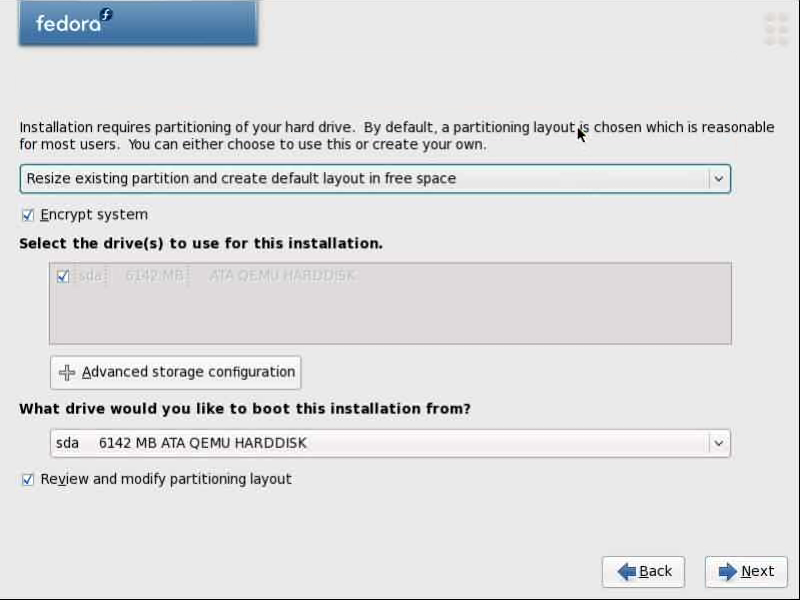
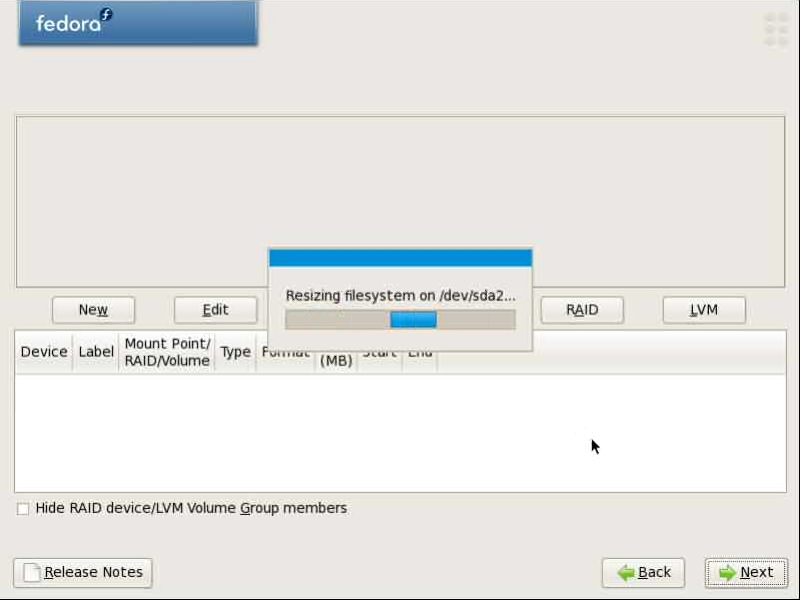
- Support for resizing ext2, ext3 and NTFS partitions during the installation
- Support for creating and installing to encrypted filesystems
- Experimental support for installing to ext4 filesystems - you will need to use the
ext4boot parameter to enable this - Support for native installation to x86_64 machines EFI with booting via GRUB
- Support for network installations and system rescue operations has been improved with the introduction of netinst.iso.
Watch screencasts here and here to learn more.
Seamless Upgrade
If you have been using a older release and looking for a easy way to upgrade to the latest one, wait no more. Fedora new features a preupgrade software tool that does a in-place upgrade to a new release of Fedora in a safe and easy way. You can upgrade from Fedora 7 to Fedora 8 and from Fedora 7 or 8 to Fedora 9 release using this tool. Refer to PreUpgrade page for more details.
File:Releases 9 SingleSourceSummary preupgrade.png
Persistent Live USB Support
Work has continued to better integrate the live images with the rest of the system and improve the tools used for building them. livecd-creator now also provides an API which can be used for building alternative front-ends as well as for building tools for other types of images.
Live USB disks can be created even on Microsoft Windows using Fedora's liveusb-creator
File:Releases 9 SingleSourceSummary liveusb.png
Also, it is now possible to non-destructively install a Fedora live image onto any USB stick that is more than one GB and have it act persistently. What this means is that you can use the live system, install and update software, work and save documents all as you would on a normal system and have your changes carried over from boot to boot. To use this feature, you simply need to run the following command:
livecd-iso-to-disk --overlay-size-mb 512 /path/to/iso /path/tousbstick
where 512 is the desired size in megabytes of the overlay. Note that you will need to have space on your USB stick for the live limage plus your overlay plus any other data you want on the stick.
Jidgo Download
Fedora 9 now provides template files that can be used to download Fedora 9 via jidgo or jigsaw downloader. If you have a local mirror or previous release image, this can save you lots of bandwidth. Learn more from the installation guide for Fedora 9.
FreeIPA
FreeIPA makes managing auditing, identity and policy processes easier by providing web-based and command line provisioning and administration tools that takes the pain away from system administration. It combines the power of the Fedora Directory Server with FreeRADIUS, MIT Kerberos, NTP and DNS to provide an easy, out of the box solution.
Upstart Init Daemon
Fedora 9 uses the Upstart init daemon as a replacement for System V init. The benefit of this is that Upstart has a more sophisticated idea of how to to trigger and manage services. For Fedora this is particularly useful as it will help us to improve our boot and shutdown processes, streamlining a lot of what currently happens.
All current init scripts should run without errors. However, any customizations to /etc/inittab (except initdefault) will need to be ported to upstart. For information on how to do so, please see the Upstart Getting Started Guide .
File:Releases 9 SingleSourceSummary upstart.png
Virtualization
Virtualization in Fedora 9, as with many of our previous releases, has received some significant new features and improvements. The information available here is a brief summary, to find more information about these features visit the feature list .
- Upstream paravirt_ops based kernel for Xen DomU
- Virt authentication
- Virtual Manager Policy Kit
- KVM supports the use of the virtio accelerated drivers for improving IO performance.
- KVM defaults to emulating an e1000 network adapter and the VMWare SVGA display adapter
Ext4 Filesystem Support
Fedora 9 features experimental support for the new Ext4 filesystem. List of enhancements include:
- Large filesystem
- Extents
- Backward compatibility
- Forward compatibility
- Persistent pre-allocation
- Delayed allocation
- Break 32000 subdirectory limit
- Journal checksumming
- Online defragmentation
- Faster file system checking
- Multiblock allocator
- Improved timestamps
Learn more at https://ols2006.108.redhat.com/2007/Reprints/mathur-Reprint.pdf
Toolchain Enhancements
There are many core toolchain changes including a move to a brand new GCC 4.3 as the system compiler the entire distribution has been built against a a major new version of Perl 5.10.
TexLive Tex Formatting System
TexLive has replace the aging and unmaintained tetex release. TeXLive is actively developed and modern TeX formatting system which is widely used for typesetting, scientific and presentation purposes.
Font Changes
During the Fedora 8 release cycle, Fedora got a new Font Special Interest Group. Working exclusively to ensure that our packaged fonts meet with our own standards with respect to free software, and cater to as many languages as possible, they have been busy reviewing and packaging new fonts for Fedora 9. There's much more work still to be done, but below is a brief summary of what has been achieved so far:
- !DejaVu full replaces !DejaVu LGC as default font set. !DejaVu LGC is still available in the repo for users who prefer it.
- The Luxi font has been dropped since its license does not allow modifications.
- !DejaVu and Liberation updated to new versions with more coverage.
- The Stix, Tiresias, Yanonne, and Greek Font Society font sets, and several others, have been added to the Fedora software repository.
- Many font packages were renamed and reorganized to avoid bundling font and regions.
Kernel 2.6.25
Fedora 9 Beta features a 2.6.25-rc5 based kernel. 2.6.25-rc5 includes:
- CPU "group scheduling"
- memory fragmentation avoidance
- tickless support for x86-64/ppc and other architectures
- many new wireless drivers and a new wireless configuration interface
- SPI/SDIO MMC support
- USB authorization
- per-device dirty memory thresholds
- support for PID and network namespaces
- support for static probe markers
- read-only bind mounts
- SELinux performance improvements
- SATA link power management and port multiplier support
- Large Receive Offload in network devices
- memory hot-remove support
- a new framework for controlling the idle processor power management
- CIFS ACLs support
- many new drivers, and other features and fixes
Release Notes
Full copy of the release notes?
Docs/Beats is the rawhide notes.




Fedora Release Overview
Release Summary
Quick highlights of the release; two paragraphs and one list of seven to twelve items. Alternately, one list of five major highlights, then a long list of all features in alpha-order. f-marketing-list decides the top items per release.
Release Notes snips from the Release Summary to the end.
Press kit snips from this Release Summary only.
Release/#/Summary snips from Release Summary to the end.
Release Overview
Four to eight paragraphs, multiple sections.
Each of the below sections can be snipped for various SIG specific needs.
Could be one per SIG or one per functional category or ... f-marketing-l to decide?
Server Overview
Desktop Overview
Applications Overview
Contributors Overview
Fedora Tour
You can find a tour filled with pictures and videos of this exciting new release at Tours/Fedora9.
New in Fedora
This release includes significant new versions of many key components and technologies. The following sections provide a brief overview of major changes from the last release of Fedora.
Spins
Fedora includes several different spins , which are variations of Fedora built from a specific set of software packages. Each spin has a combination of software to meet the requirements of a specific kind of end user. In addition to a boot.iso image for network installation, users have the following spin choices:
- A regular Fedora image for desktops, workstations, and server users. This spin provides a good upgrade path and similar environment for users of previous releases of Fedora.
- One of several Live images that can be run from a disc or USB flash device, and can be installed to hard disk as desired. Refer to the Live section for more information about the Live images.
More custom spins are available at http://spins.fedoraproject.org . These Live images can be used on USB media via the livecd-iso-to-disk utility available in the livecd-tools package.
Jigdo
Fedora releases are also available via Jigdo. This distribution method can improve the speed of obtaining the installation ISO images. Instead of waiting for torrent downloads to complete, Jigdo seeks the fastest mirrors it can find via the Fedora Project Mirror Manager infrastructure, and downloads the bits it needs from these mirrors. To optimize seeking these bits, you can tell Jigdo to scan a DVD or CD you already have, and cut down on redundant downloads. This feature becomes particularly useful if you:
- Download all the test releases and then get the final release, in which case you have 90% of the data already with each subsequent download.
- Download both the DVD and the CD set, in which case the DVD holds 95% of the data needed for the CD sets.
- Download any combination of the above.
Features
- This release features GNOME 2.22 . GNOME now includes a webcam photo and video creation utility called Cheese, improved network filesystem support, a new international clock applet, Google Calendar support and custom email labels in Evolution, a new Remote Desktop Viewer, improved accessibility features, and PolicyKit integration.
- KDE 4.2.2
is available in the KDE Live image as well as the regular DVD.
- Xfce 4.4.2
is available as part of this release.
- NetworkManager 0.7 provides improved mobile broadband support, including GSM and CDMA devices, and now supports multiple devices and ad-hoc networking for sharing connections.
- The Fedora installer, Anaconda, now supports partition resizing, encrypted filesystems, independent locations for the second stage installer and the software packages. A redesigned, larger
netboot.isoimage now features a second stage installer partly for this reason.
- Ext4 , the next version of the mature and stable ext3 filesystem is available as a option in this release. Ext4 features better performance, higher storage capacity and several other new features.
- The completely free and open source Java environment OpenJDK 6 is installed by default. IcedTea 7, derived from OpenJDK 1.7, is no longer the default. IcedTea includes a browser plugin based on GCJ, and is available for both x86 and x86_64 architectures. GCJ is still the default on PPC architecture.
- OpenOffice.org 2.4/ with many new features , is available as part of Fedora 25
.
- Fedora now includes Perl 5.10.0 , which features a smaller memory footprint and other improvements.
- Eclipse 3.3.2 is available as part of this release.
- PackageKit , a new set of graphical and console tools for cross-distribution software management, is installed by default in this release of Fedora. The Package
Kit graphical updater is also installed by default, instead of Pup. Behind PackageKit, the performance ofyumhas been significantly improved. Pup and Pirut are still available in the software repositories for users that prefer them.
- This release of Fedora uses Upstart , an event-based replacement for the
/sbin/initdaemon.
- Fedora now includes TeXLive to replace the older, unmaintained TeX distribution.
- Fedora 25 features a 2.6.27 based kernel.
- Work on the start-up and shutdown in X has yielded noticeable improvements.
Road Map
The proposed plans for the next release of Fedora are available at RoadMap.
Fedora 9 (codename) Release Summary
The Fedora 9 release summary provides a quick overview of the major new features in this release. Why not download and enjoy this great combination of the latest and most robust free and open source software available. Enjoy your freedom!
Download
Fedora 9 Tour
What's New in Fedora 9?
Exciting feature blah
Lah lah lah
Wonderful improvement foo
oh my!. Screenshots..
Release Notes Overview
Feature List
Fedora 9 Interviews
You can find a lot more information about many new features in Fedora 9 from the individual developers at Interviews.
Known Issues
This needs to be ready far in advance and translated.
This footer needs to stand alone and be useful without any leading in material in case it is the only translated content a user is able to read.
Straw man below pulled and updated from Fedora 8 announcement footer.
GET FEDORA
WHAT'S NEW?
To read about all the latest changes, visit: http://docs.fedoraproject.org/release-notes/
For a summary, visit: Releases/9/ReleaseSummary
JOIN US!
To find ways you can help and participate, visit: http://fedoraproject.org/join-fedora